
生产环境中docker网络该如何配置(2)
导读:生产环境中docker网络该如何配置,监控和日志记录: 实施网络监控和日志记录策略,以便在出现问题时能够快速定位和解决。 这可以通过使用网络监控工具(如Prometheus、Grafana等)和日志
生产环境中docker网络该如何配置
监控和日志记录:
实施网络监控和日志记录策略,以便在出现问题时能够快速定位和解决。
这可以通过使用网络监控工具(如Prometheus、Grafana等)和日志收集系统(如ELK Stack)来实现。
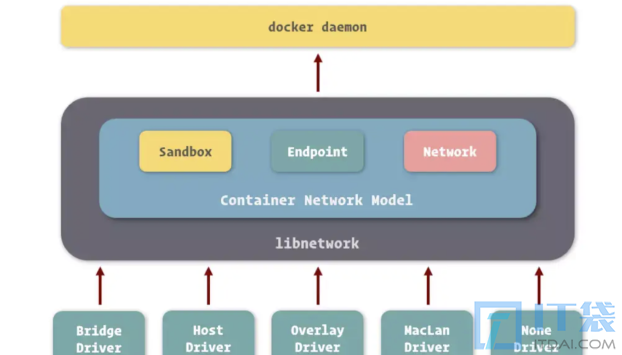
第二部分、生产环境实战
这里以在生产环境使用docker-compose 创建redis集群为例,我们着重看这里的网络配置部分。
首先需要配置网络以确保集群内的节点能够相互通信,我们以docker-compose.yml 文件配置的方式展示。
文件里需要定义一个自定义网络,这样Redis集群中的容器就可以通过容器名称来相互通信,而不需要知道具体的 IP 地址。
docker-compose.yml 文件内容如下:
version: '3'

networks:
  redis-net:
    driver: bridge
    ipam:
      config:
        - subnet: 172.20.0.0/16

services:
  redis-node-1:
    image: redis
    command: redis-server --cluster-enabled yes --appendonly yes --cluster-config-file nodes.conf --cluster-node-timeout 5000 --port 6379
    networks:
      redis-net:
        ipv4_address:  172.20.0.40
    ports:
      - "6379:6379"

  redis-node-2:
    image: redis
    command: redis-server --cluster-enabled yes --appendonly yes --cluster-config-file nodes.conf --cluster-node-timeout 5000 --port 6379
    networks:
      - redis-net
    ports:
      - "6380:6379"
    deploy:
      replicas: 1
      restart_policy:
        condition: on-failure

  redis-node-3:
    image: redis
    command: redis-server --cluster-enabled yes --appendonly yes --cluster-config-file nodes.conf --cluster-node-timeout 5000 --port 6379
    networks:
      - redis-net
    ports:
      - "6382:6379"
    deploy:
      replicas: 1
      restart_policy:
        condition: on-failure

  redis-node-4:
    image: redis
    command: redis-server --cluster-enabled yes --appendonly yes --cluster-config-file nodes.conf --cluster-node-timeout 5000 --port 6379
    networks:
      - redis-net
    ports:
      - "6383:6379"
    deploy:
      replicas: 1
      restart_policy:
        condition: on-failure

  redis-node-5:
    image: redis
    command: redis-server --cluster-enabled yes --appendonly yes --cluster-config-file nodes.conf --cluster-node-timeout 5000 --port 6379
    networks:
      - redis-net
    ports:
      - "6384:6379"
    deploy:
      replicas: 1
      restart_policy:
        condition: on-failure

  redis-node-6:
    image: redis
    command: redis-server --cluster-enabled yes --appendonly yes --cluster-config-file nodes.conf --cluster-node-timeout 5000 --port 6379
    networks:
      - redis-net
    ports:
      - "6385:6379"

# 可添加一个服务来创建和管理Redis集群
# ...
相关阅读
-
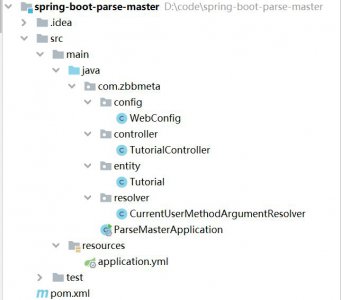
Spring Boot中实现自定义参数解析器
全面为您解析Spring的教程内容,下面来一起了解一下吧。 在Spring Boot应用程序中,处理请求时经常需要解析并处理传入的参数。 Spring MVC提供了强大的参数解析机制 ,但有时候我们可能需要定
-
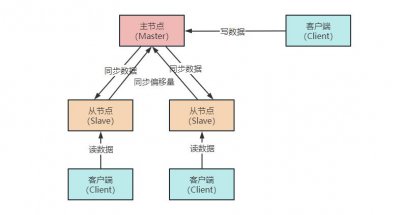
Redis主从复制原理详解
小编为大家说一说Redis主从复制原理详解的相关话题,如有不对的地方欢迎指正! 众所周知,一个数据库系统想要实现高可用,主要从以下两个方面来考虑: 保证数据安全不丢失 系统可以正常
-

怎么用自己的公司注册网站 建立自己公司的网站步骤
跟大家分享怎么用自己的公司注册网站和建立自己公司的网站步骤方面的讲解,接下来IT袋小编就来介绍。 很多公司在刚成立的时候,就会考虑建立网站,一个公司网站就等于是一张互联网名
-

mysql数据库安装包多大 分享MySQL数据库教程
这些知识你了解吗?mysql数据库安装包多大和分享MySQL数据库教程的IT小经验,接下来就是全面介绍。 今天我们手把手教学如何下载安装MySQL。 1.浏览器搜索MySQL,找到官网并点击进入。 2.直接点