
hosts文件删除了怎么恢复 一键还原hosts文件的教程(2)
hosts文件删除了怎么恢复
- 4第四步:删除记事本的全部内容,将以下内容复制到文件中然后保存:
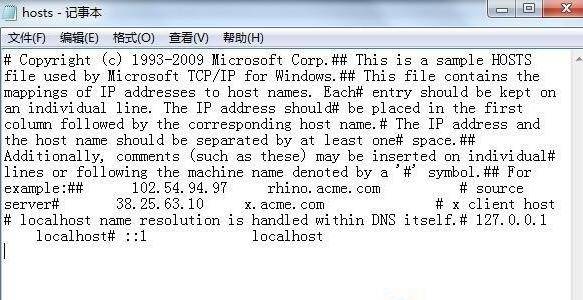
- 5第五步:然后将修改后的hosts文件放到
c:windowssystem32driversetc来替换以前的hosts文件,即可完成修复。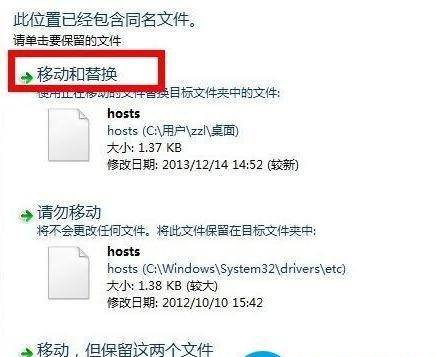
# Copyright (c) 1993-2009 Microsoft Corp.## This is a sample HOSTS file used by Microsoft TCP/IP for Windows.## This file contains the mappings of IP addresses to host names. Each# entry should be kept on an individual line. The IP address should# be placed in the first column followed by the corresponding host name.# The IP address and the host name should be separated by at least one# space.## Additionally, comments (such as these) may be inserted on individual# lines or following the machine name denoted by a ‘#’ symbol.## For example:## 102.54.94.97 rhino.acme.com # source server# 38.25.63.10 x.acme.com # x client host
# localhost name resolution is handled within DNS itself.# 127.0.0.1 localhost# ::1 localhost
以上分享的hosts文件删除了怎么恢复 以及 一键还原hosts文件的教程的全面方法讲解,希望为您起一个抛砖引玉袋作用,能解决您生活中的问题吧。

相关阅读
-
u盘受损最简单的修复方法 教你解除u盘写保护状态
关于u盘受损最简单的修复方法和教你解除u盘写保护状态的教程内容,下面IT袋为您详细介绍 u盘是非常实用的可移动硬盘工具,不过用久了难免也会出现故障问题,这种就需要修复u盘损坏才能
-

dreamweaver哪个版本好用一点 分享dreamweaver新手教程
跟大家说一说dreamweaver哪个版本好用一点和分享dreamweaver新手教程方面的讲解,接下来IT袋小编为大家介绍。 在程序开发中,代码编辑器对于程序开发者来说是十分重要的,一个好的代码编辑器
-

爱家畅享会员怎么关闭 爱家畅享会员连续包月怎么取消
你是不是想知道爱家畅享会员连续包月怎么取消方面的内容,爱家畅享会员取消连续包月一共有两步,可以在电视订购管理中进行取消。以下是具体的操作步骤:
-

快手极速版怎么切换账号 快手极速版怎样切换账号
文章摘要:快手极速版怎么切换账号的介绍,关于快手极速版怎么切换账号 跟 快手极速版怎样切换账号,很不错的方法小知识,建议收藏哦! 不少的IT袋网友都下载了快手极速版,那么快手极