
基于Express的微信公众号开发(2)
导读:基于Express的微信公众号开发,添加公众号IP白名单配置 微信公众平台进入“安全中心的“IP白名单里填写,跟js-sdk鉴权相关的所有ip 新浪云相关IP的位置:文档中心-入口与出口IP外网访
基于Express的微信公众号开发
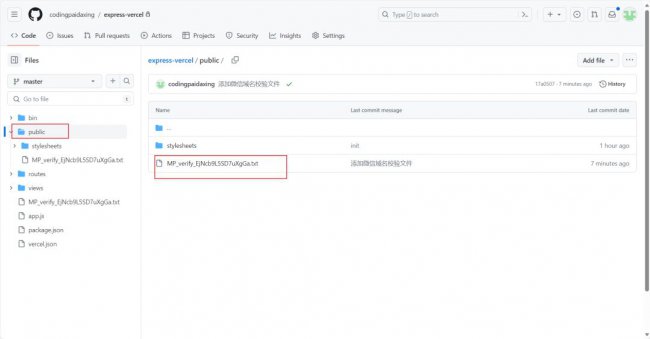
添加公众号IP白名单配置
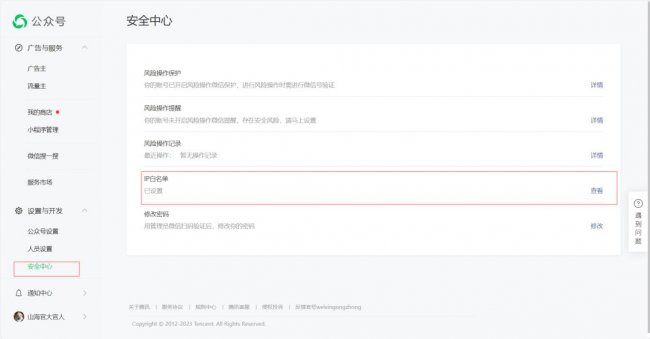
微信公众平台进入“安全中心”的“IP白名单”里填写,跟js-sdk鉴权相关的所有ip 新浪云相关IP的位置:文档中心—-入口与出口IP—–外网访问出口IP列表
微信公众平台进入“安全中心”的“IP白名单”里填写,跟js-sdk鉴权相关的所有ip 新浪云相关IP的位置:文档中心—-入口与出口IP—–外网访问出口IP列表
如图:
步骤二:引入JS文件
在需要调用Js接口的页面引l入如下Js文件,(支持https):http://res.wx.qq.com/open/js/jweixin-1.4.0.js官方文档:https://developers.weixin.qq.com/doc/offiaccount/OA_Web_Apps/JS-SDK.html
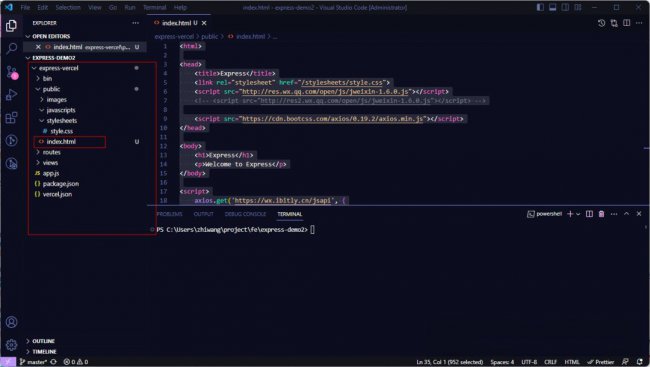
我在项目目录public中添加了index.html文件,并在该文件中引入了js文件。
具体文件如下:
<html>
<head>
    <title>Express</title>
    <link rel="stylesheet" href="/stylesheets/style.css">
    <script src="https://www.itdai.com/uploads/allimg/240124/1I600M23-5.jpg"></script>
    <!-- <script src="https://www.itdai.com/uploads/allimg/240124/1I6004014-6.jpg"></script> -->
    <script src="https://www.itdai.com/uploads/allimg/240124/1I6001128-7.jpg"></script>
</head>
<body>
    <h1>Express</h1>
    <p>Welcome to Express</p></body>
<script>
    axios.get('https://wx.ibitly.cn/jsapi', {
        url: encodeURIComponent(location.href.split('#')[0])
    }).then((res)=>{
        wx.config({
            debug: true, // 开启调试模式,调用的所有api的返回值会在客户端alert出来,若要查看传入的参数,可以在pc端打开,参数信息会通过log打出,仅在pc端时才会打印。
            appId: '', // 必填,公众号的唯一标识
            timestamp: '', // 必填,生成签名的时间戳
            nonceStr: '', // 必填,生成签名的随机串
            signature: '',// 必填,签名
            jsApiList: [] // 必填,需要使用的JS接口列表
        });
    })

</script>
</html>
项目层级:
步骤三、微信公众号服务器配置
编写公众号鉴权接口
参考文档:https://developers.weixin.qq.com/doc/offiaccount/Basic_Information/Access_Overview.html
参考文档:https://developers.weixin.qq.com/doc/offiaccount/Basic_Information/Access_Overview.html
express-vercle/routes/index.js
var express = require('express');
var router = express.Router();
// 通过命令 npm i sha1 安装 sha1
var sha1 = require('sha1');
/* GET home page. */
router.get('/', function(req, res, next) {
  res.render('index', { title: 'Express' });
});
/* weixin-鉴权接口 参考文档:https://developers.weixin.qq.com/doc/offiaccount/Basic_Information/Access_Overview.html*/
router.get('/wx-auth', function(req, res, next) {
  let {signature, timestamp, nonce, echostr} = req.query;
  let token = 'paidaxing';
  let array = [timestamp, nonce, token];
  array.sort(); // 字典排序
  let str = array.join('');
  let resultStr = sha1(str) // 对字符串str进行sha1进行加密
  if(resultStr === signature) {
    res.set('Content-Type', 'text/plain')
    res.send(echostr);
  }else {
    res.send('Error!!!!!!')
  }
});
module.exports = router;
配置公众号的服务器
如图所示:


相关阅读
-

淘宝经常退货有什么影响 淘宝经常退货会不会有什么影响
正文核心导读:淘宝经常退货有什么影响方面的讲解,淘宝经常退货会对极速退款有影响,另外,退货次数多的话有可能运费险无法购买。
-
页脚横线怎么添加在文字上方 单独设置每页页脚教程
为大家分享页脚横线怎么添加在文字上方和单独设置每页页脚教程方面的讲解,一起跟随小编看看吧! 日常工作中,特别是一些专业的文件,都是一定的规格要求的,比如必须添加页眉页脚,
-

黑鲨4pro配置 黑鲨4pro怎么恢复出厂设置
IT袋网为你介绍黑鲨4pro怎么恢复出厂设置的相关知识,1、打开手机设置,点击【我的设备】。2、点击【备份与恢复】。3、点击【清除所有数据】。
-
sd卡根目录是哪个文件夹里面 把文件放到sd卡根目录的方法
今天介绍sd卡根目录是哪个文件夹里面和把文件放到sd卡根目录的方法的内容,如有不对的地方欢迎指正! 触摸屏上显示一些输入控件(如开关按键、字符串输入框、指示灯等)以支持外部命令