
h3c端口批量加入vlan命令 华三批量配置端口vlan
h3c端口批量加入vlan命令

华为、华三H3C交换机如何将端口、接口多个批量加入Vlan?可能很多新手不知道在哪个配置模式视图下去操作,下面IT袋小编就给大家分享H3C交换机批量配置端口Vlan命令,帮助各位同学快速学习交换机入门。
方法步骤:
进入对应的Vlan 视图,输入以下命令:
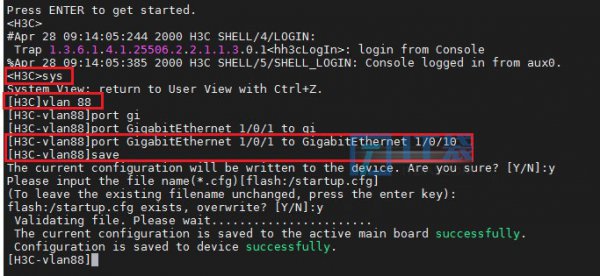
<H3C>system-view[H3C]vlan 88[H3C-vlan88]port GigabitEthernet 1/0/1 to GigabitEthernet 1/0/10[H3C-vlan88]save命令解析:
system-view:进入 系统视图 才有权限配置交换机,发生的变化和辨别方法就是:<H3C>由尖括号变为:[H3C] 中括号
vlan 88:进入Vlan 配置模式,进入Vlan 88,没有该Vlan 将自动创建Vlan 88
port GigabitEthernet 1/0/1 to GigabitEthernet 1/0/10:将交换机 千兆口1口至10口 加入批量加入 Vlan 88
save:保存配置,根据以下提示回答:Y
The current configuration will be written to the device. Are you sure? [Y/N]:yPlease input the file name(*.cfg)[flash:/startup.cfg](To leave the existing filename unchanged, press the enter key):flash:/startup.cfg exists, overwrite? [Y/N]:y Validating file. Please wait....................... The current configuration is saved to the active main board successfully. Configuration is saved to device successfully.配置过程如下图所示:
查看并验证我们交换机的:千兆口1至10口是否被加入Vlan 88,输入以下命令查看 Vlan下的接口
[H3C]display vlan 88如下图所示:
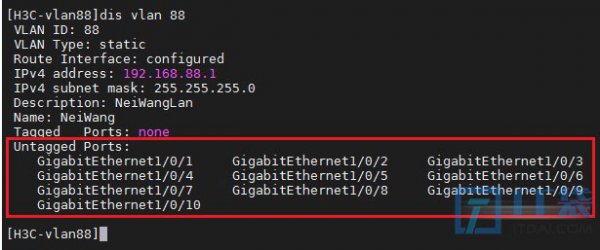
默认这些被批量加入Vlan 88 的端口/接口 为:access 类型,可以直接接:电脑这类网络终端设备。
以上分享的h3c端口批量加入vlan命令 华三批量配置端口vlan的详细方法介绍,大家作为一个参考建议.


相关阅读
-
电脑找回彻底删除的文件夹 回收站清空的文件恢复技巧
IT袋网为你介绍电脑找回彻底删除的文件夹和回收站清空的文件恢复技巧的方法内容,具体详情如下: 在这种互联网大数据时代,拥有电脑的用户基本上都存放着许多的图片、视频、文档、音
-
电脑怎么查看mac地址 教你查看电脑mac地址方法
为大家说一说电脑怎么查看mac地址和教你查看电脑mac地址方法的相关知识,相关内容具体如下: 每一台主机都有其唯一的mac地址,下面给大家带来win8使用dos命令查看mac地址步骤。 1 第一步:使
-

qq怎么破解加好友答案 qq加好友答案破解软件
IT袋网小编为你介绍qq怎么破解加好友答案的IT小经验,qq不支持破解加好友答案,如果需要加好友,可以直接请认识的人介绍,QQ加好友详细操作步骤如下:
-

红米k40是曲面屏么 红米k40游戏增强版是曲面屏吗
小编带来的是红米k40游戏增强版是曲面屏吗的相关话题,红米k40游戏增强版不是曲面屏,它采用了一块6.67英寸的直面OLED屏幕,分辨率为2400×1080,支持120Hz高刷。