
如何关闭139和445端口策略 cmd关闭445端口命令(2)
如何关闭139和445端口策略
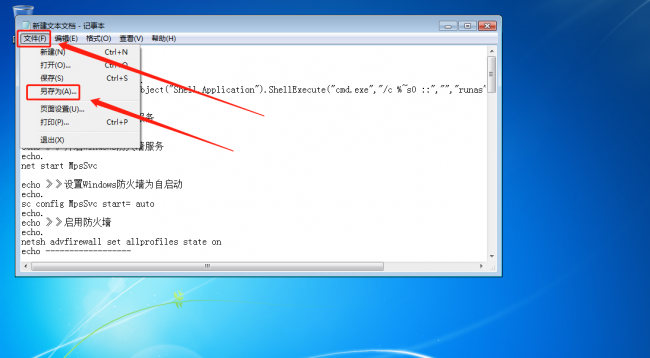
@echo offcolor 0A echo.echo 》》获取管理员权限...%1 mshta vbscript:CreateObject("Shell.Application").ShellExecute("cmd.exe","/c %~s0 ::","","runas",1)(window.close)&&exit@echo off color 0A title 一键屏蔽危险端口和服务echo.echo 》》开启Windows防火墙服务echo.net start MpsSvcecho 》》设置Windows防火墙为自启动echo.sc config MpsSvc start= autoecho.echo 》》启用防火墙echo.netsh advfirewall set allprofiles state onecho ------------------echo -------------------------------------------------echo.echo 》》正在屏蔽135端口 请稍候… netsh advfirewall firewall delete rule name = "Disable port 135 - TCP"netsh advfirewall firewall add rule name = "Disable port 135 - TCP" dir = in action = block protocol = TCP localport = 135 netsh advfirewall firewall delete rule name = "Disable port 135 - UDP"netsh advfirewall firewall add rule name = "Disable port 135 - UDP" dir = in action = block protocol = UDP localport = 135:修改注册表reg add "hklm\SOFTWARE\Microsoft\Ole" /v "EnableDCOM" /t reg_sz /d "N" /freg add "hklm\SOFTWARE\Microsoft\Rpc" /v "DCOM Protocols" /t reg_multi_sz /d "" /freg add "hklm\SOFTWARE\Microsoft\Rpc\internet" /t reg_sz /fecho.echo ------------------echo -------------------------------------------------echo.echo 》》正在屏蔽137端口 请稍候… echo.netsh advfirewall firewall delete rule name = "Disable port 137 - TCP"netsh advfirewall firewall add rule name = "Disable port 137 - TCP" dir = in action = block protocol = TCP localport = 137netsh advfirewall firewall delete rule name = "Disable port 137 - UDP"netsh advfirewall firewall add rule name = "Disable port 137 - UDP" dir = in action = block protocol = UDP localport = 137echo ------------------echo -------------------------------------------------echo.echo 》》正在屏蔽138端口 请稍候… netsh advfirewall firewall delete rule name = "Disable port 138 - TCP"netsh advfirewall firewall add rule name = "Disable port 138 - TCP" dir = in action = block protocol = TCP localport = 138netsh advfirewall firewall delete rule name = "Disable port 138 - UDP"netsh advfirewall firewall add rule name = "Disable port 138 - UDP" dir = in action = block protocol = UDP localport = 138echo ------------------echo -------------------------------------------------echo.echo 》》正在屏蔽139端口 请稍候… netsh advfirewall firewall delete rule name = "Disable port 139 - TCP"netsh advfirewall firewall add rule name = "Disable port 139 - TCP" dir = in action = block protocol = TCP localport = 139netsh advfirewall firewall delete rule name = "Disable port 139 - UDP"netsh advfirewall firewall add rule name = "Disable port 139 - UDP" dir = in action = block protocol = UDP localport = 139echo.echo 》》关闭TCP/IP NetBIOS Helper(lmhosts)共享服务echo.sc stop lmhostssc config lmhosts start= disabledecho.echo ------------------echo -------------------------------------------------echo.echo 》》正在关闭445端口 请稍候… netsh advfirewall firewall delete rule name = "Disable port 445 - TCP"netsh advfirewall firewall add rule name = "Disable port 445 - TCP" dir = in action = block protocol = TCP localport = 445netsh advfirewall firewall delete rule name = "Disable port 445 - UDP"netsh advfirewall firewall add rule name = "Disable port 445 - UDP" dir = in action = block protocol = UDP localport = 445echo.echo 》》关闭Server(LanmanServer)服务echo.sc stop LanmanServersc config LanmanServer start= disabledecho.echo 》》关闭NetBT服务echo.sc stop NetBTsc config NetBT start= disabled:修改注册表reg add "hklm\System\CurrentControlSet\Services\NetBT\Parameters" /v "SMBDeviceEnabled" /t reg_dword /d "0" /fecho.echo ------------------echo -------------------------------------------------echo.echo 》》关闭Workstation(LanmanWorkstation)服务echo.sc stop LanmanWorkstationsc config LanmanWorkstation start= disabledecho.echo ------------------echo -------------------------------------------------echo.echo 》》关闭Distributed Transaction Coordinator(MSDTC)共享服务echo.sc stop MSDTCsc config MSDTC start= disabledecho.echo ------------------echo -------------------------------------------------echo.echo 》》危险端口已经关闭,请重新启动电脑后用netstat -an命令查看本地端口echo.echo 》》请按任意键退出!echo.pause>nul
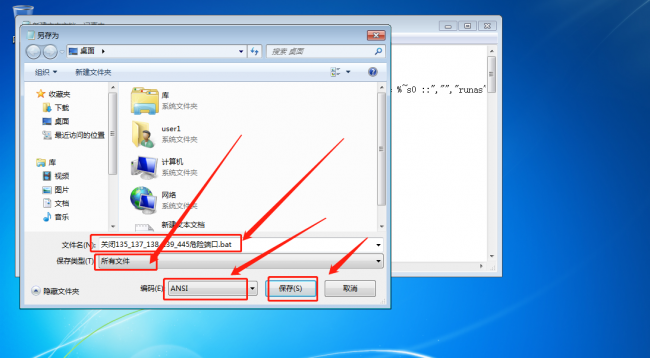
输入文件名“关闭135_137_138_139_445危险端口.bat” >>保存类型选择“所有文件”>>编码选择“ANSI” >> 点击“保存”
双击运行刚刚另存为的bat文件
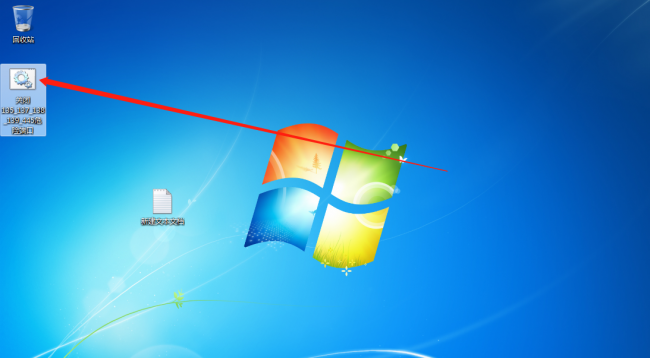
运行完成后的状态如下图所示

相关阅读
-

武汉科技大学分数线多少 武汉计算机专业学校排名
一篇IT技术小知识,为您介绍武汉科技大学分数线多少和武汉计算机专业学校排名的相关知识,一起来看看吧! 武汉科技大学 2023年硕士研究生复试及录取方案 具体如下 根据教育部《关于做好
-
视频怎么p脸 视频怎么p脸祛痘
小编为你讲解视频怎么p脸的相关内容,关于视频怎么p脸 视频怎么p脸祛痘,相关内容具体如下: 视频p脸可以在美图秀秀的视频美容进行操作即可。以手机华为p40为例,视频P脸的步骤分为3步。
-

ps保存图片什么格式 保存图片选择文件格式注意要点
如果想了解保存图片选择文件格式注意要点和ps保存图片什么格式的小经验,一起跟随IT袋网小编看看吧! 因为只讲到办公的PS的内容,我们今天只讲三种图片格式 (jpg、png、gif) ,其他格式
-

红米k40游戏增强版跑分 安兔兔跑分成绩
为网友们解答红米k40游戏增强版跑分的相关话题,红米k40游戏增强版跑分的安兔兔跑分成绩为72万分,它搭载天玑1200处理器,采用6nm EUV工艺。