
java新手代码大全实例 关于java入门基础知识(2)
java新手代码大全实例
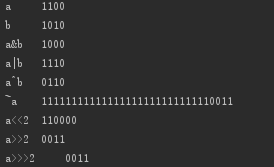
同心圆:
import java.awt.*;import javax.swing.*; public class Circle99Frame extends JFrame { public static void main(String args[]) { JFrame frame=new Circle99Frame(); frame.setDefaultCloseOperation(DISPOSE_ON_CLOSE); frame.setSize(600,600); frame.setVisible(true); } public void paint( Graphics g) { g.drawString("circle 99",20,20); int x0=getSize().width/2; int y0=getSize().height/2; for(int r=0;r<getSize().height/2;r+=10) { g.setColor(getRandomColor()); g.drawOval(x0-r,y0-r,r*2,r*2); } } Color getRandomColor() { return new Color( (int)(Math.random()*255),//random本身只产生(0~1)之间的小数, (int)(Math.random()*255), (int)(Math.random()*255) ); }}

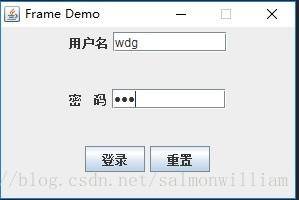
下面呢是一个常见的简陋的登陆界面,这个程序是这个两个类class共同组成的程序,先看代码:
import javax.swing.JFrame; import javax.swing.JPanel; public class DemoFrame extends JFrame{ public DemoFrame(DemoPanel panel) { this.setDefaultCloseOperation(JFrame.EXIT_ON_CLOSE); this.setSize(300, 200); this.setTitle("Frame Demo"); this.add(panel); this.setResizable(false); this.setVisible(true); } public static void main(String[] args) { DemoPanel panel = new DemoPanel(); DemoFrame Frame = new DemoFrame(panel); } }
import java.awt.GridLayout; import javax.swing.JButton; import javax.swing.JLabel; import javax.swing.JPanel; import javax.swing.JPasswordField; import javax.swing.JTextField; public class DemoPanel extends JPanel{ private JLabel labelUser, labelPassWd; //标签 用户名,密码 private JButton buttonLogin, buttonReset; //按钮 登录,重置 private JTextField textFieldUserName; //文本框 用户名输入 private JPasswordField passWdField; //密码框 密码输入 private JPanel panelUserName; private JPanel panelPassWd; private JPanel panelLoginButton; public DemoPanel(){ this.labelUser = new JLabel("用户名"); this.labelPassWd = new JLabel("密 码"); this.buttonLogin = new JButton("登录"); this.buttonReset = new JButton("重置"); this.textFieldUserName = new JTextField(10); this.passWdField = new JPasswordField(10); this.panelPassWd = new JPanel(); this.panelUserName = new JPanel(); this.panelLoginButton = new JPanel(); this.setLayout(new GridLayout(3, 1)); //网格式布局 this.panelUserName.add(this.labelUser); this.panelUserName.add(this.textFieldUserName); this.panelPassWd.add(this.labelPassWd); this.panelPassWd.add(this.passWdField); this.panelLoginButton.add(buttonLogin); this.panelLoginButton.add(buttonReset); this.add(this.panelUserName); this.add(this.panelPassWd); this.add(this.panelLoginButton); } }
程序结果如下 :
简单的加法器:
package TEST; import javax.swing.JOptionPane; //导入类 public class TEST { public static void main(String args[]) { String input_pane1,input_pane2; int n1,n2,sum; input_pane1 = JOptionPane.showInputDialog("Please input the first number"); //输入框1 input_pane2 = JOptionPane.showInputDialog("Please input the second number"); //输入框2 n1 = Integer.parseInt(input_pane1); //获取输入框中输入数据的整数类型 n2 = Integer.parseInt(input_pane2);//获取输入框中输入数据的整数类型 sum = n1+n2; JOptionPane.showMessageDialog(null, "The sum is: "+sum,"Adding Device",JOptionPane.PLAIN_MESSAGE); //第1个参数:null 显示在中央 //第2个参数:要显示的字符 //第3个参数:标题栏信息 //第4个参数:对话框类型 System.exit(0); //终结图形用户界面程序必须的 } }
结果如下:

相关阅读
-

网页制作技术教程 制作网页完整步骤
一篇很详细的教程是关于网页制作技术教程和制作网页完整步骤方面的讲解,下面IT袋为您详细介绍 随着各种网页制作工具的普及,现在不懂技术的个人也能顺利建站了。不过使用网页制作工
-

快手怎么挂断PK 快手怎么挂断直播
本文为你介绍快手怎么挂断PK的电脑方面的小经验,快手挂断PK一共有三步,只需要点击退出的图标进行挂断即可。具体操作步骤如下:
-

cmd重置网络配置 笔记本dns异常上不了网解决办法
跟大家聊一聊cmd重置网络配置和笔记本dns异常上不了网解决办法的IT知识,接下来分享详细内容。 日常使用笔记本很多人都是连接Wifi来使用,而当下主流笔记本基本都搭载Wifi6技术,即第六代
-
微信视频通话铃声怎么恢复默认 微信语音和视频通话提醒怎么恢复默
为大家介绍的是微信视频通话铃声怎么恢复默认方面的讲解。有的用户在使用微信的过程中,把视频通话的铃声换成了各种铃声,想要设置成为自己喜欢的音乐,但是实际上不太使用,想要知