
freebuds语音唤醒语音助手 华为freebudspro2怎么唤醒语音助手
导读:华为freebudspro2怎么唤醒语音助手,一篇关于华为freebudspro2怎么唤醒语音助手的教程内容,华为freebudspro2设置唤醒语音助手共分为两步,只需要设定手势操作即可。具体操作步骤如下:
华为freebudspro2怎么唤醒语音助手
一篇关于华为freebudspro2怎么唤醒语音助手的教程内容,关于华为freebudspro2怎么唤醒语音助手 和 怎么唤醒小艺,具体介绍如下:

华为freebudspro2怎么唤醒语音助手的详细步骤介绍
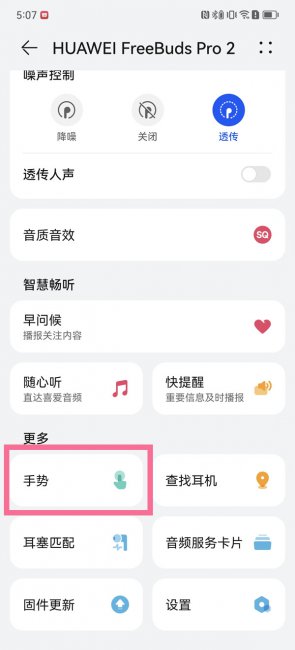
- 1第一步:连接耳机后,打开智慧生活App,进入耳机详情设置页,点击【手势】。
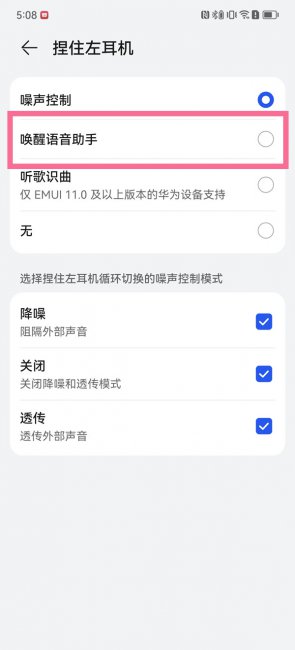
- 2第二步:切换至“捏住”页面,点击【捏住左/右耳机】,选择【唤醒语音助手】。
以上就是怎么唤醒小艺 和 华为freebudspro2怎么唤醒语音助手的详细讲解,仅供大家参考建议!


相关阅读
-

华为mate30otG模式怎么打开 华为mate30的ot g功能在哪里开启
你是不是想知道华为mate30otG模式怎么打开的相关知识,华为mate30otG模式是默认开启的,无需设置,直接通过OTG数据线,就可以让手机直接访问U盘或数码相机等设备中的文件。具体操作步骤如下
-
ios16怎么连拍 ios16.16怎么连拍
小编为网友们解答ios16怎么连拍的话题,ios16可以使用音量键进行连,但需要在相机设置中开启。其共分为两步,具体操作步骤如下:
-
苹果手机电池容量为什么会增加 苹果电池最大容量为什么会降低
小编为你讲解苹果手机电池容量为什么会增加的小经验,关于苹果手机电池容量为什么会增加 苹果电池最大容量为什么会降低,接下来带大家一起了解。 苹果手机电池容量增加是因为开启了电
-

苹果设置几个面容 iphone可以设置几个面容
小编为大家讲一讲iphone可以设置几个面容的IT小经验,iphone可以设置2个面容,录入一个面容ID之后,还可以设置一个替用外貌。设置替用外貌步骤如下: