
华为mate20pro怎么调时间 如何调时间
导读:华为mate20pro怎么调时间,为网友解答华为mate20pro怎么调时间方面的介绍,华为mate20pro调时间共需三个步骤,在日期和时间中即可设置。具体操作步骤如下:
华为mate20pro怎么调时间
为网友解答华为mate20pro怎么调时间方面的介绍,关于华为mate20pro怎么调时间 和 如何调时间,一定能解决您的问题的,一起来了解吧!

华为mate20pro怎么调时间的详细方法介绍
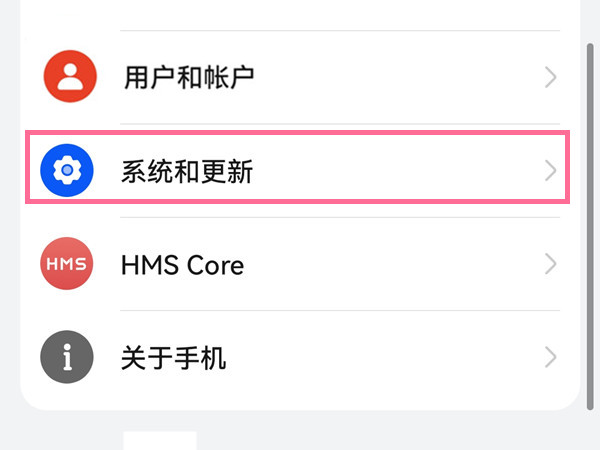
- 1第一步:在手机设置菜单中点击【系统和更新】。
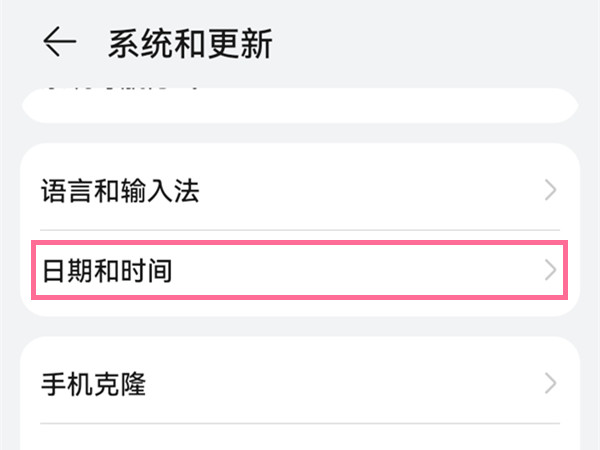
- 2第二步:点击【日期和时间】。
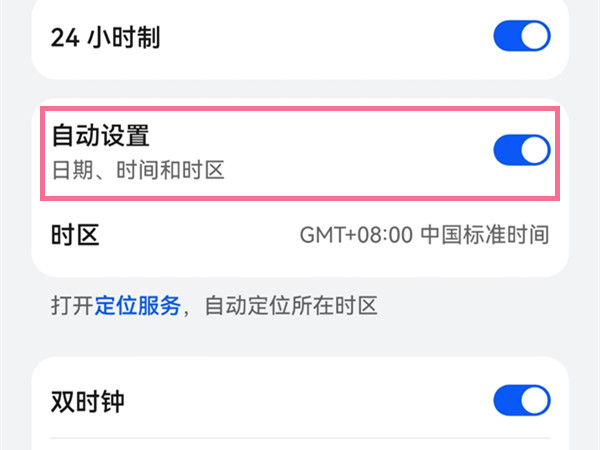
- 3第三步:关闭【自动设置】右侧的开关,点击时间和日期进行设置即可。
以上IT袋网介绍的如何调时间 和 华为mate20pro怎么调时间的具体内容,未经IT袋网(www.itdai.com)允许禁止转载!


相关阅读
-

vivos10pro有nfc吗 vivos10pro有没有nfc功能
为大家分享vivos10pro有nfc吗方面的内容,vivos10pro有nfc功能,支持交通卡、门禁卡、vivo Pay、eID(公民网络电子身份标识),出门告别实体卡,省事又省力。
-

vivox60怎么开启省电模式 vivox60pro省电模式怎么设置
小编为你解答vivox60pro省电模式怎么设置方面的知识,vivox60pro设置省电模式有在手机设置里设置和在控制中心两种方式,以在设置中开启为例,具体操作步骤如下:
-

华为拉黑了能收到对方信息吗 华为拉黑后对方发短信还有显示吗
下面为网友们详细介绍华为拉黑了能收到对方信息吗的相关知识,华为拉黑了能收到对方信息,对方发送的短信,可在骚扰拦截中查看该对方的短信。查看拦截的短信操作方法如下:
-

小米max2什么时候停产的 关于小米停产的机型
一篇关于小米max2什么时候停产的和关于小米停产的机型的IT小经验,下面为详细的介绍。 3月25日,小米商城正式下架了大屏旗舰手机小米max,目前小米商城有六款小米系列手机和五款红米系列