
opporeno5微信怎么加密 opporeno5微信加密在哪里设置
导读:opporeno5微信怎么加密,今天为网友们详解opporeno5微信怎么加密的IT知识,opporeno5设置微信加密共需要三步,只需要在应用锁设置中打开微信开关即可。具体操作方法如下:
opporeno5微信怎么加密
今天为网友们详解opporeno5微信怎么加密的IT知识,关于opporeno5微信怎么加密 跟 opporeno5微信加密在哪里设置,下面IT袋为您详细介绍

opporeno5微信怎么加密的详细步骤
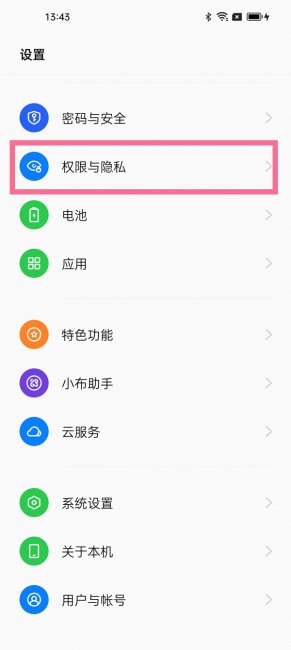
- 1第一步:打开手机设置,点击【权限与隐私】。
- 2第二步:选择应用锁,设置好隐私密码。
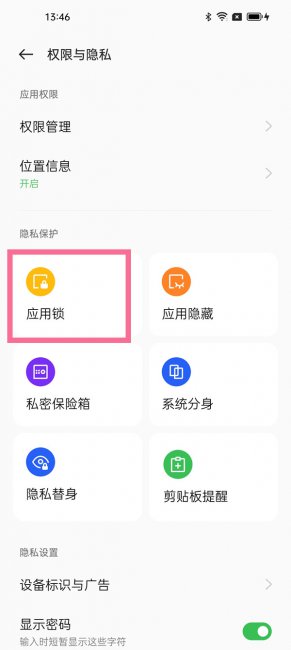
- 3第三步:在应用锁设置页面,打开微信右侧的开关。

以上是IT袋网www.itdai.com关于opporeno5微信加密在哪里设置 跟 opporeno5微信怎么加密的详细方法介绍,大家作为一个参考建议。


相关阅读
-

oppofindx3电源键唤醒小布怎么关闭 关闭电源键唤醒小布
为大家分享oppofindx3电源键唤醒小布怎么关闭方面的介绍,1、打开手机设置中的【Breeno】。2、点击【Breeno语音】选项。3、关闭【长按电源键0.5秒唤醒】右侧的开关。
-

拯救者电竞手机2Pro是什么音频变焦 拯救者电竞手机2Pro音频
全面的为您讲解拯救者电竞手机2Pro是什么音频变焦的内容,拯救者电竞手机2Pro是Audio Zoom音频变焦,拯救者电竞手机2 Pro搭载骁龙888旗舰芯片,采用5nm制程工艺打造,配合LPDDR5加UFS3.1满血版的内
-

华为电脑哪里看型号 华为电脑怎么看电脑型号
如果想知道华为电脑怎么看电脑型号方面的讲解,华为电脑看电脑型号共两步。只需按下组合键输入dxdiag,指定系统型号进行查看即可,具体操作步骤如下:
-

华为sp100是什么型号 华为spnal100多少钱
为大家介绍华为sp100是什么型号的相关话题,sp100是NZONE S7手机,它配备了一块6.5英寸的LCD屏幕,采用水滴屏设计,顶部边框2.55毫米,侧边框2.13毫米,屏占比达到89.3%。