
iqoo怎么开OTG iqoo手机怎么开启otg功能
导读:iqoo手机怎么开启otg功能,今日重点为您介绍iqoo手机怎么开启otg功能的教程内容,iqoo手机开启otg功能共分为两步,只需要找到OTG开关即可打开。具体操作步骤如下:
iqoo手机怎么开启otg功能
今日重点为您介绍iqoo手机怎么开启otg功能的教程内容,关于iqoo手机怎么开启otg功能、怎么使用otg功能,接下来一起来看看吧。
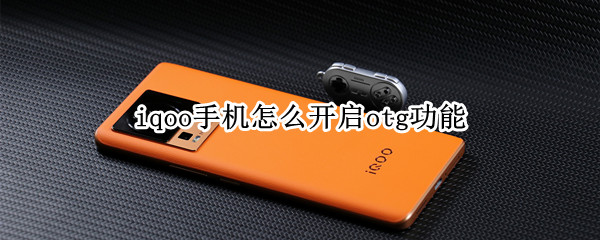
iqoo手机怎么开启otg功能具体操作方法
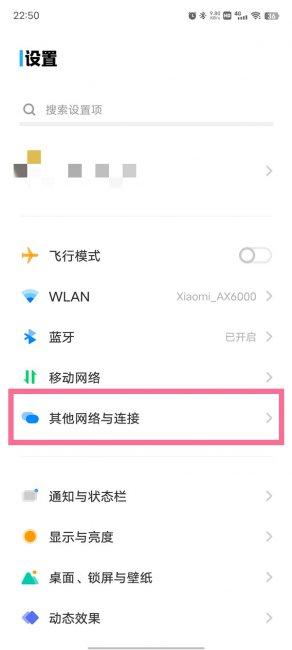
- 1第一步:打开手机设置,点击【其他网络与连接】。
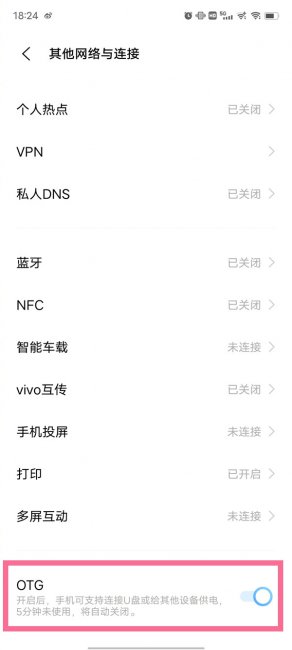
- 2第二步:打开【OTG】右侧开关,然后通过OTG线将手机与设备连接即可。
以上就是怎么使用otg功能、iqoo手机怎么开启otg功能的全面介绍了,希望给[www.itdai.com]的网友们带来一些相关知识。

相关阅读
-

ip地址可以改吗 改ip地址有什么用
小编为网友们解答改ip地址有什么用的相关介绍,关于ip地址可以改吗 改ip地址有什么用,接下来小编为大家介绍。 1、突破自身IP访问限制,教育网、公司网等。 2、访问一些单位或团体内部资
-

好玩的手机网游排行榜推荐 口碑比较好的手游网游
如果想了解好玩的手机网游排行榜推荐和口碑比较好的手游网游方面的介绍,接下来IT袋小编就来介绍。 移动端手机游戏现在已经成为了潮流,而且随便用手机系统的不断发展和完善,同时移
-

华为mate50怎么隐藏相册 华为mate50怎样隐藏相册
正文核心介绍:华为mate50怎么隐藏相册的相关知识,华为mate50隐藏相册共分为两步,在图库中找到隐藏相册入口进行隐藏。以下是具体操作步骤:
-

pbdmoo是oppo什么型号手机 oppo手机pbamoo型号多少钱
IT袋网为你介绍pbdmoo是oppo什么型号手机的相关介绍,pbdmoo是oppoR17Pro全网通的手机型号,其采用6.4英寸水滴屏,分辨率为2340*1080,屏占比为91.5%。