
华为mate30epro怎么添加门禁卡 华为mate30epro如何添加门禁卡
导读:华为mate30epro怎么添加门禁卡,今日重点为您介绍华为mate30epro怎么添加门禁卡的相关话题,华为mate30epro添加门禁卡分为三步,只需要在华为钱包app里进行操作即可,具体操作步骤如下:
华为mate30epro怎么添加门禁卡
今日重点为您介绍华为mate30epro怎么添加门禁卡的相关话题,关于华为mate30epro怎么添加门禁卡、如何添加门禁卡,一起来了解了解吧。

华为mate30epro怎么添加门禁卡的具体方法介绍
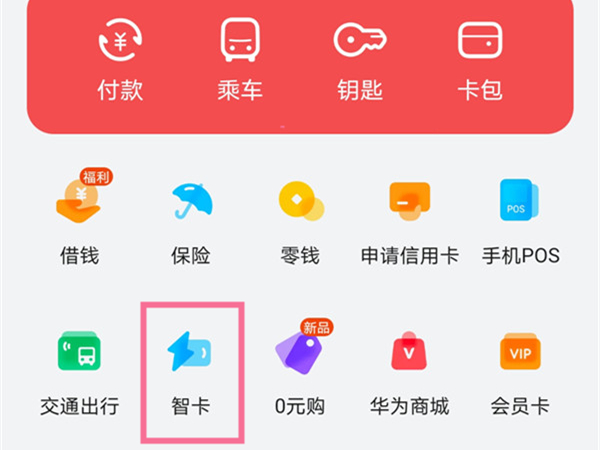
- 1第一步:打开华为钱包APP,点击首页顶部的【智卡】。
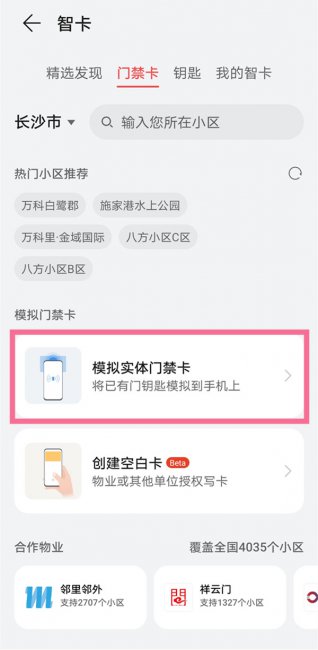
- 2第二步:点击【模拟实体门禁卡】。
- 3第三步:将实体门禁卡贴在手机背面的NFC区域,读卡完成后保存即可。

本文分享的如何添加门禁卡、华为mate30epro怎么添加门禁卡的具体内容,未经IT袋网(www.itdai.com)允许禁止转载!


相关阅读
-

忘记密码又不想恢复出厂设置 40秒破华为锁屏密码
为大家介绍的是忘记密码又不想恢复出厂设置和40秒破华为锁屏密码的内容,接下来小编为网友介绍。 日常生活经常会遇到这样的情况,有朋友来家里做客想连接家里的密码,发现密码忘记的
-

华为watch3怎么连接手机 配对手机教程
关于华为watch3怎么连接手机方面的介绍,华为watch3连接手机分为三步,在手机上的华为运动健康app中添加手表进行连接即可。具体操作步骤如下:
-

oppo手机怎么看电池健康程度 oppo手机怎么看电池使用情况?
小编为大家解答oppo手机怎么看电池健康程度的介绍,oppo手机没有查看健康度入口设计,如需检测电池损耗,可前往服务中心检测电池,如果想查看手机剩余电量可开启电池百分比,具体操作步
-

苹果相册怎么放慢视频 苹果手机相册视频如何慢放
你是不是想知道苹果手机相册视频如何慢放的介绍,苹果手机相册视频慢放需要选择视频进行编辑。下面就为大家带来具体的操作步骤: