
win10光盘映像文件怎么安装到电脑 光盘安装win10系统安装教程(2)
win10光盘映像文件怎么安装到电脑
<?xml version="1.0" encoding="utf-8"?><unattend xmlns="urn:schemas-microsoft-com:unattend"> <settings pass="generalize"> <component name="Microsoft-Windows-PnpSysprep" processorArchitecture="amd64" publicKeyToken="31bf3856ad364e35" language="neutral" versionScope="nonSxS" xmlns:wcm="http://schemas.microsoft.com/WMIConfig/2002/State" xmlns:xsi="http://www.w3.org/2001/XMLSchema-instance"> <DoNotCleanUpNonPresentDevices>true</DoNotCleanUpNonPresentDevices> <PersistAllDeviceInstalls>true</PersistAllDeviceInstalls> </component> </settings> <settings pass="specialize"> <component name="Microsoft-Windows-Deployment" processorArchitecture="amd64" publicKeyToken="31bf3856ad364e35" language="neutral" versionScope="nonSxS" xmlns:wcm="http://schemas.microsoft.com/WMIConfig/2002/State" xmlns:xsi="http://www.w3.org/2001/XMLSchema-instance"> <RunSynchronous> <RunSynchronousCommand wcm:action="add"> <Order>1</Order> <Path>net user administrator /active:yes</Path> <WillReboot>Never</WillReboot> <Description>Enable Admin Account</Description> </RunSynchronousCommand> </RunSynchronous> </component> <component name="Microsoft-Windows-Shell-Setup" processorArchitecture="amd64" publicKeyToken="31bf3856ad364e35" language="neutral" versionScope="nonSxS" xmlns:wcm="http://schemas.microsoft.com/WMIConfig/2002/State" xmlns:xsi="http://www.w3.org/2001/XMLSchema-instance"> <CopyProfile>true</CopyProfile> <TimeZone>China Standard Time</TimeZone> </component> <component name="Microsoft-Windows-UnattendedJoin" processorArchitecture="amd64" publicKeyToken="31bf3856ad364e35" language="neutral" versionScope="nonSxS" xmlns:wcm="http://schemas.microsoft.com/WMIConfig/2002/State" xmlns:xsi="http://www.w3.org/2001/XMLSchema-instance"> <Identification> <JoinWorkgroup>WORKGROUP</JoinWorkgroup> </Identification> </component> <component name="Microsoft-Windows-MicrosoftEdgeBrowser" processorArchitecture="amd64" publicKeyToken="31bf3856ad364e35" language="neutral" versionScope="nonSxS" xmlns:wcm="http://schemas.microsoft.com/WMIConfig/2002/State" xmlns:xsi="http://www.w3.org/2001/XMLSchema-instance"> <FavoriteBarItems> <FavoriteBarItem wcm:action="add"> <ItemFavIconFile>http://dh.lanfutun.com/favicon.ico</ItemFavIconFile> <ItemKey>lanfutun</ItemKey> <ItemName>官网导航</ItemName> <ItemUrl>http://dh.lanfutun.com</ItemUrl> </FavoriteBarItem> </FavoriteBarItems> </component> </settings> <settings pass="oobeSystem"> <component name="Microsoft-Windows-Shell-Setup" processorArchitecture="amd64" publicKeyToken="31bf3856ad364e35" language="neutral" versionScope="nonSxS" xmlns:wcm="http://schemas.microsoft.com/WMIConfig/2002/State" xmlns:xsi="http://www.w3.org/2001/XMLSchema-instance"> <OOBE> <ProtectYourPC>2</ProtectYourPC> <SkipMachineOOBE>true</SkipMachineOOBE> <SkipUserOOBE>true</SkipUserOOBE> </OOBE> <UserAccounts> <LocalAccounts> <LocalAccount wcm:action="add"> <Description>Default Administrator Account</Description> <DisplayName>Administrator</DisplayName> <Group>Administrators</Group> <Name>Administrator</Name> </LocalAccount> </LocalAccounts> </UserAccounts> </component> </settings> <settings pass="windowsPE"> <component name="Microsoft-Windows-Setup" processorArchitecture="amd64" publicKeyToken="31bf3856ad364e35" language="neutral" versionScope="nonSxS" xmlns:wcm="http://schemas.microsoft.com/WMIConfig/2002/State" xmlns:xsi="http://www.w3.org/2001/XMLSchema-instance"> <EnableFirewall>false</EnableFirewall> <EnableNetwork>false</EnableNetwork> <Restart>Restart</Restart> <UserData> <AcceptEula>true</AcceptEula> <ProductKey> <Key></Key> </ProductKey> </UserData> </component> <component name="Microsoft-Windows-International-Core-WinPE" processorArchitecture="amd64" publicKeyToken="31bf3856ad364e35" language="neutral" versionScope="nonSxS" xmlns:wcm="http://schemas.microsoft.com/WMIConfig/2002/State" xmlns:xsi="http://www.w3.org/2001/XMLSchema-instance"> <SetupUILanguage> <UILanguage>zh-CN</UILanguage> </SetupUILanguage> <InputLocale>en-US;zh-CN</InputLocale> <LayeredDriver>1</LayeredDriver> <SystemLocale>zh-CN</SystemLocale> <UILanguage>zh-CN</UILanguage> <UserLocale>zh-CN</UserLocale> <UILanguageFallback>en-US</UILanguageFallback> </component> </settings> <cpi:offlineImage cpi:source="wim:e:/osdiy/install.wim#wps" xmlns:cpi="urn:schemas-microsoft-com:cpi" /></unattend>

相关阅读
-

window10系统控制面板在哪里找 windows10控制面板在哪里找到打开
小编为你介绍windows10控制面板在哪里找到打开方面的讲解,关于window10系统控制面板在哪里找 windows10控制面板在哪里找到打开,接下来一起来看看吧。 我们在使用win10操作系统的时候,发现系
-
win10任务栏假死原因 win101909任务栏假死怎么样修复
今天分享:win101909任务栏假死怎么样修复的教程内容,关于win10任务栏假死原因 win101909任务栏假死怎么样修复,下面为详细的介绍。 在我们使用win10操作系统的时候,更新了新的1909版本有的情
-
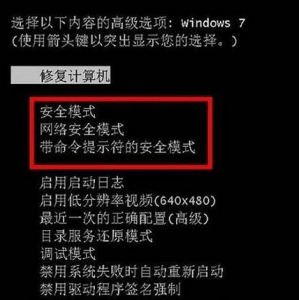
win10怎么进入安全模式启动项 电脑蓝屏一键修复的技巧
一篇关于win10怎么进入安全模式启动项和电脑蓝屏一键修复的技巧的电脑小知识,接下来IT袋带大家一起了解。 如果Win7系统硬件驱动程序或网络相等,您可以输入安全模式以修复,但对于许多
-

一般电脑功率 电脑功率大小详细介绍
今日小编为你讲解电脑功率大小详细介绍的电脑小知识,关于一般电脑功率 电脑功率大小详细介绍,下面来一起了解一下吧。 买了电脑的小伙伴很多都很担心自己的电脑会不会功率功率过大,