
Linux系统中安装MATLAB和Mathematica(3)
导读:Linux系统中安装MATLAB和Mathematica,我的完整安装界面如下 Wolfram Mathematica 13.3.1 for LINUX Installer ArchiveVerifying archive integrity. Extracting installer. ...........................................................-----
Linux系统中安装MATLAB和Mathematica
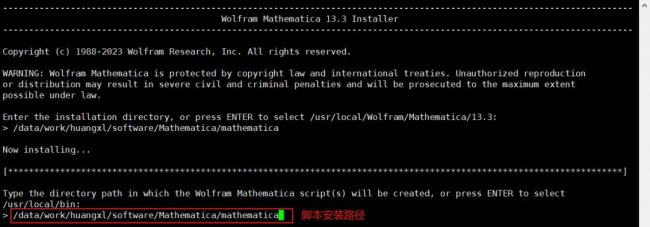
我的完整安装界面如下
Wolfram Mathematica 13.3.1 for LINUX Installer Archive
Verifying archive integrity.
Extracting installer. ...........................................................
-------------------------------------------------------------------------------------------------------------------------
                                          Wolfram Mathematica 13.3 Installer
-------------------------------------------------------------------------------------------------------------------------
Copyright (c) 1988-2023 Wolfram Research, Inc. All rights reserved.
WARNING: Wolfram Mathematica is protected by copyright law and international treaties. Unauthorized reproduction
or distribution may result in severe civil and criminal penalties and will be prosecuted to the maximum extent
possible under law.
Enter the installation directory, or press ENTER to select /usr/local/Wolfram/Mathematica/13.3:
> /data/work/huangxl/software/Mathematica/mathematica
Now installing...
[**********************************************************************************************************************]
Type the directory path in which the Wolfram Mathematica script(s) will be created, or press ENTER to select
/usr/local/bin:
> /data/work/huangxl/software/Mathematica/mathematica
WolframScript allows Wolfram Language code to be run from the command line and from self-executing script files. It
is always available from /data/work/huangxl/software/Mathematica/mathematica/Executables/wolframscript. WolframScript
system integration makes the wolframscript binary accessible from any terminal, and allows .wls script files to be
executed by double-clicking them in the file manager.
Install WolframScript system integration? (y/n)
> y
--------------------------------------------------------------------------------
          Wolfram Language 13.3 English Documentation 13.3 Installer
--------------------------------------------------------------------------------
Copyright (c) 1988-2023 Wolfram Research, Inc. All rights reserved.
WARNING: Wolfram Language 13.3 English Documentation is protected by copyright
law and international treaties. Unauthorized reproduction or distribution
may result in severe civil and criminal penalties and will be prosecuted to
the maximum extent possible under law.
All users of this computer will be able to use this software.
Y
Now installing...
[*****************************************************************************]
Installation complete.
# 配置环境变量
vi ~/.bashrc
export PATH=/data/work/huangxl/software/Mathematica/mathematica:$PATH
source ~/.bashrc
# 通过以上配置,在终端输入“mathematica”会打开图形界面;在终端输入“wolfram”则不会显示 在终端输入wolfram,如下图所示,没有图形界面。

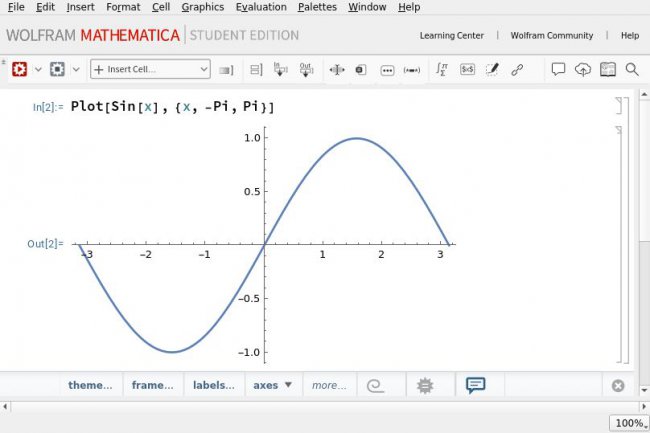
在终端输入mathematica,如下图所示,有图形界面,我们可以进行画图。
以上是IT袋网网关于Linux系统中安装MATLAB和Mathematica的IT小经验,希望能为您在生活中带来帮助!
相关阅读
-

win10 iso文件怎么安装系统 iso系统文件怎么用u盘安装win10
你是不是想知道iso系统文件怎么用u盘安装win10的IT知识,关于win10 iso文件怎么安装系统 iso系统文件怎么用u盘安装win10,接下来IT袋小编就来介绍。 我们在准备使用U盘为自己的电脑进行系统重装
-
win10台式电脑怎么调节屏幕亮度 电脑调节屏幕亮度的方法
您可能不了解win10台式电脑怎么调节屏幕亮度和电脑调节屏幕亮度的方法的相关经验,具体介绍如下: 现在的电脑是很方便的,可以说我们日常的生活中离不开电脑了。但是电脑屏幕亮度怎么
-
如何删除360导航强制主页win10
一篇关于如何删除360导航强制主页win10的生活小知识,相关内容具体如下: 如果您使用360导航,可能会遇到一种情况——使用Win10为主题。这不是很方便,带来不小的困扰。在本篇文章中,我们
-
电脑怎么重装系统 u盘重装系统win10系统教程
跟大家聊一聊电脑怎么重装系统和u盘重装系统win10系统教程的话题,很不错的方法小知识,建议收藏哦! 遇到系统损坏进不去的情况,要想重装系统就只有通过系统盘来启动电脑,再进行重装