
Linux文件映射的查看方法有哪些(2)
导读:Linux文件映射的查看方法有哪些,example.c文件 #include stdio.h>#include stdlib.h>#include sys/mman.h>#include sys/types.h>#include sys/stat.h>#include fcntl.h>#include unistd.h>#include string.h>int main() { const char *file_path
Linux文件映射的查看方法有哪些
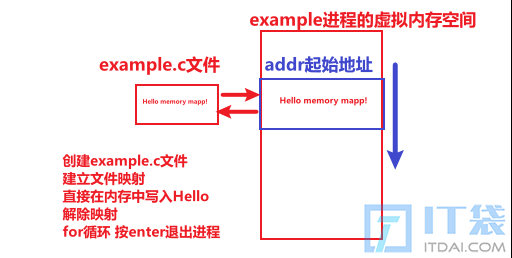
example.c文件
#include <stdio.h>
#include <stdlib.h>
#include <sys/mman.h>
#include <sys/types.h>
#include <sys/stat.h>
#include <fcntl.h>
#include <unistd.h>
#include <string.h>
int main() {
    const char *file_path = "example.txt";
    const size_t file_size = 4096;
    int fd = open(file_path, O_RDWR | O_CREAT, S_IRUSR | S_IWUSR);
    if (fd == -1) {
        perror("open");
        exit(EXIT_FAILURE);
    }
    if (ftruncate(fd, file_size) == -1) {
        perror("ftruncate");
        close(fd);
        exit(EXIT_FAILURE);
    }
    // Create a memory-mapped region
    void *addr = mmap(NULL, file_size, PROT_READ | PROT_WRITE, MAP_SHARED, fd, 0);
    if (addr == MAP_FAILED) {
        perror("mmap");
        close(fd);
        exit(EXIT_FAILURE);
    }
    // Now 'addr' points to the beginning of the file in memory
    // 现在addr表示文件在进程的内存空间代表区域的起始位置
    // Write a message to the memory-mapped file
    // 向映射文件写入一句消息。
    const char *message = "Hello, Memory Mapping!\n";
    strncpy(addr, message, strlen(message));
    printf("Press Enter to exit...\n");
    getchar();  // Wait for user to press Enter
    // Unmap the memory region  解除文件和内存区域的映射关系
    if (munmap(addr, file_size) == -1) {
        perror("munmap");
        close(fd);
        exit(EXIT_FAILURE);
    }
    // Close the file descriptor
    close(fd);
    return 0;
}
编译执行:
$ ls
example.c
$ gcc example.c -o example
$ ./example
Press Enter to exit...
查看进程的文件映射信息:
$ ps aux|grep example
codersong   1524542  0.0  0.0   2776  1152 pts/0    S+   19:23   0:00 ./example
codersong   1524547  0.0  0.0  12188  2432 pts/2    S+   19:23   0:00 grep --color=auto example
$ pmap -X 1524542
1524542:   ./example
          地址 Perm 偏移量 设备   Inode Size  Rss Pss Pss_Dirty Referenced Anonymous LazyFree ShmemPmdMapped FilePmdMapped Shared_Hugetlb Private_Hugetlb Swap SwapPss Locked THPeligible Mapping
    557b482c3000 r--p  00000000  08:03 7124051    4    4   4         0          4         0        0              0             0              0               0    0       0      0           0 example
    557b482c4000 r-xp  00001000  08:03 7124051    4    4   4         0          4         0        0              0             0              0               0    0       0      0           0 example
    557b482c5000 r--p  00002000  08:03 7124051    4    4   4         0          4         0        0              0             0              0               0    0       0      0           0 example
    557b482c6000 r--p  00002000  08:03 7124051    4    4   4         4          4         4        0              0             0              0               0    0       0      0           0 example
    557b482c7000 rw-p  00003000  08:03 7124051    4    4   4         4          4         4        0              0             0              0               0    0       0      0           0 example
    557b48e9e000 rw-p  00000000  00:00       0  132    4   4         4          4         4        0              0             0              0               0    0       0      0           0 [heap]
    7f8fe5600000 r--p  00000000  08:03  264612  160  160   7         0        160         0        0              0             0              0               0    0       0      0           0 libc.so.6
    7f8fe5628000 r-xp  00028000  08:03  264612 1620  788  24         0        788         0        0              0             0              0               0    0       0      0           0 libc.so.6
    7f8fe57bd000 r--p  001bd000  08:03  264612  352   64   1         0         64         0        0              0             0              0               0    0       0      0           0 libc.so.6
    7f8fe5815000 r--p  00214000  08:03  264612   16   16  16        16         16        16        0              0             0              0               0    0       0      0           0 libc.so.6
    7f8fe5819000 rw-p  00218000  08:03  264612    8    8   8         8          8         8        0              0             0              0               0    0       0      0           0 libc.so.6
    7f8fe581b000 rw-p  00000000  00:00       0   52   20  20        20         20        20        0              0             0              0               0    0       0      0           0
    7f8fe58f6000 rw-p  00000000  00:00       0   12    8   8         8          8         8        0              0             0              0               0    0       0      0           0
    7f8fe5908000 rw-p  00000000  00:00       0    8    4   4         4          4         4        0              0             0              0               0    0       0      0           0
    7f8fe590a000 r--p  00000000  08:03  264600    8    8   0         0          8         0        0              0             0              0               0    0       0      0           0 ld-linux-x86-64.so.2
    7f8fe590c000 r-xp  00002000  08:03  264600  168  168   7         0        168         0        0              0             0              0               0    0       0      0           0 ld-linux-x86-64.so.2
    7f8fe5936000 r--p  0002c000  08:03  264600   44   40   1         0         40         0        0              0             0              0               0    0       0      0           0 ld-linux-x86-64.so.2
    7f8fe5941000 rw-s  00000000  08:03 7124052    4    4   4         0          4         0        0              0             0              0               0    0       0      0           0 example.txt
    7f8fe5942000 r--p  00037000  08:03  264600    8    8   8         8          8         8        0              0             0              0               0    0       0      0           0 ld-linux-x86-64.so.2
    7f8fe5944000 rw-p  00039000  08:03  264600    8    8   8         8          8         8        0              0             0              0               0    0       0      0           0 ld-linux-x86-64.so.2
    7ffef93f2000 rw-p  00000000  00:00       0  132   12  12        12         12        12        0              0             0              0               0    0       0      0           0 [stack]
    7ffef9485000 r--p  00000000  00:00       0   16    0   0         0          0         0        0              0             0              0               0    0       0      0           0 [vvar]
    7ffef9489000 r-xp  00000000  00:00       0    8    4   0         0          4         0        0              0             0              0               0    0       0      0           0 [vdso]
ffffffffff600000 --xp  00000000  00:00       0    4    0   0         0          0         0        0              0             0              0               0    0       0      0           0 [vsyscall]
                                               ==== ==== === ========= ========== ========= ======== ============== ============= ============== =============== ==== ======= ====== ===========
                                               2780 1344 152        96       1344        96        0              0             0              0               0    0       0      0           0 KB
$
$
$ cat /proc/1524542/maps
557b482c3000-557b482c4000 r--p 00000000 08:03 7124051                    /home/codersong/zhengshihong/example
557b482c4000-557b482c5000 r-xp 00001000 08:03 7124051                    /home/codersong/zhengshihong/example
557b482c5000-557b482c6000 r--p 00002000 08:03 7124051                    /home/codersong/zhengshihong/example
557b482c6000-557b482c7000 r--p 00002000 08:03 7124051                    /home/codersong/zhengshihong/example
557b482c7000-557b482c8000 rw-p 00003000 08:03 7124051                    /home/codersong/zhengshihong/example
557b48e9e000-557b48ebf000 rw-p 00000000 00:00 0                          [heap]
7f8fe5600000-7f8fe5628000 r--p 00000000 08:03 264612                     /usr/lib/x86_64-linux-gnu/libc.so.6
7f8fe5628000-7f8fe57bd000 r-xp 00028000 08:03 264612                     /usr/lib/x86_64-linux-gnu/libc.so.6
7f8fe57bd000-7f8fe5815000 r--p 001bd000 08:03 264612                     /usr/lib/x86_64-linux-gnu/libc.so.6
7f8fe5815000-7f8fe5819000 r--p 00214000 08:03 264612                     /usr/lib/x86_64-linux-gnu/libc.so.6
7f8fe5819000-7f8fe581b000 rw-p 00218000 08:03 264612                     /usr/lib/x86_64-linux-gnu/libc.so.6
7f8fe581b000-7f8fe5828000 rw-p 00000000 00:00 0
7f8fe58f6000-7f8fe58f9000 rw-p 00000000 00:00 0
7f8fe5908000-7f8fe590a000 rw-p 00000000 00:00 0
7f8fe590a000-7f8fe590c000 r--p 00000000 08:03 264600                     /usr/lib/x86_64-linux-gnu/ld-linux-x86-64.so.2
7f8fe590c000-7f8fe5936000 r-xp 00002000 08:03 264600                     /usr/lib/x86_64-linux-gnu/ld-linux-x86-64.so.2
7f8fe5936000-7f8fe5941000 r--p 0002c000 08:03 264600                     /usr/lib/x86_64-linux-gnu/ld-linux-x86-64.so.2
7f8fe5941000-7f8fe5942000 rw-s 00000000 08:03 7124052                    /home/byzoro/zhengshihong/example.txt
7f8fe5942000-7f8fe5944000 r--p 00037000 08:03 264600                     /usr/lib/x86_64-linux-gnu/ld-linux-x86-64.so.2
7f8fe5944000-7f8fe5946000 rw-p 00039000 08:03 264600                     /usr/lib/x86_64-linux-gnu/ld-linux-x86-64.so.2
7ffef93f2000-7ffef9413000 rw-p 00000000 00:00 0                          [stack]
7ffef9485000-7ffef9489000 r--p 00000000 00:00 0                          [vvar]
7ffef9489000-7ffef948b000 r-xp 00000000 00:00 0                          [vdso]
ffffffffff600000-ffffffffff601000 --xp 00000000 00:00 0                  [vsyscall]
相关阅读
-
U盘如何重装系统win10 电脑蓝屏无法正常启动恢复方法
为大家说一说U盘如何重装系统win10和电脑蓝屏无法正常启动恢复方法的相关知识,下面小编为您详细解答 电脑在日常生活和工作中是使用的比较多的。随着时间的推移,电脑越来越卡,系统越
-
怎么把软件设置为开机启动项 如何不用其他软件设置开机启动项
如果想知道如何不用其他软件设置开机启动项的IT小经验,关于怎么把软件设置为开机启动项 如何不用其他软件设置开机启动项,接下来小编为网友介绍。 开机速度慢是很多电脑新手最大的烦
-
xbox商店更改地区设置教程 xboxone怎么切换商店区域
一篇IT技术小知识,为您介绍xbox商店更改地区设置教程的相关知识,关于xbox商店更改地区设置教程 xboxone怎么切换商店区域,接下来就是全面介绍。 当要买的游戏出现没有的情况,可以通过更
-
windows10旗舰版怎么升级到win10 小白一键重装系统步骤
为大家介绍windows10旗舰版怎么升级到win10和小白一键重装系统步骤方面的知识,下面为详细的介绍。 来了,这次win10用户,真的是时候升级win10系统了! 确实,IT袋网小编也知道win10系统很不错