
.net framework安装失败解决教程
.net framework安装失败解决教程
本文核心导读:.net framework安装失败解决教程的电脑小知识,关于.net framework安装失败解决教程,请看下面详细的介绍。
.net framework4.0是不少的IT袋用户都需要日常使用到的软件可是在安装的时候很多都出现了失败的情况,今天就给你们带来了.net framework安装失败解决方法,有需要的话就快来看看吧。
.net framework 4.0安装失败怎么办:
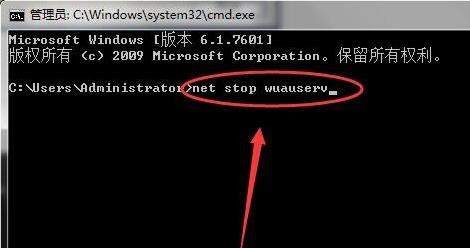
1、首先打开计算机,然后打开dos,再输入“net stop wuauserv”来停止服务。
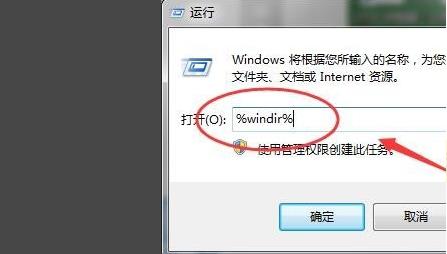
2、然后在运行界面内敲击键盘输入“%windir%”。
3、此时会打开一个文件夹,在这个文件夹中找到“SoftwareDistribution”文件夹。
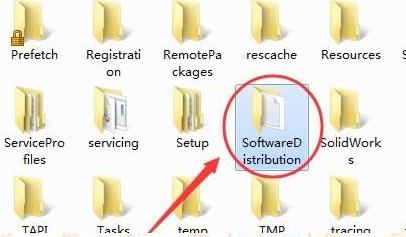
4、将这个文件夹重命名为“sdold”。


相关阅读
-

win10微软商店怎么设置中文 microsoft store中文设置方法
一个电脑小知识,为大家介绍microsoft store中文设置方法的IT小经验,关于win10微软商店怎么设置中文 microsoft store中文设置方法,接下来IT袋带大家一起了解。 最近越来越多的人选择使用microsof
-

windows11镜像文件在哪里下载 windows11镜像下载位置及教程介绍
为大家介绍windows11镜像下载位置及教程介绍IT技巧方面的经验,关于windows11镜像文件在哪里下载 windows11镜像下载位置及教程介绍,请看下面详细的介绍。 如果我们的电脑是因为安全启动或者
-
win101809和1909哪个好 win101903和1909哪个好详细介绍
小编为网友们解答win101903和1909哪个好详细介绍的介绍,关于win101809和1909哪个好 win101903和1909哪个好详细介绍,请看下面详细的介绍。 我们的电脑在升级了win101903之后,接踵而来的就是微软更新
-

win10系统重启蓝屏 Win10重启黑屏/蓝屏的解决教程
跟大家分享Win10重启黑屏/蓝屏的解决教程的介绍,关于win10系统重启蓝屏 Win10重启黑屏/蓝屏的解决教程,下面小编为您详细解答 不少的IT袋用户打开电脑的时候发现电脑黑屏了。这个可能是板