
reboot and select proper boot device问题详细解决攻略教程(2)
导读:reboot and select proper boot device,5、然后发现 【Boot Option #1】为关闭状态 。然后回车查看是否有硬盘,有的话直接回车。 6、然后在此回到 【Boot Optlon #1】选项,将硬盘设为启动第一项。
reboot and select proper boot device
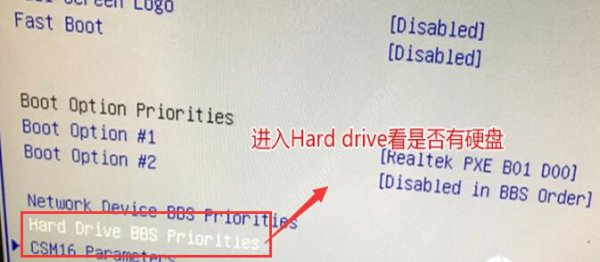
5、然后发现【Boot Option #1】为关闭状态。然后回车查看是否有硬盘,有的话直接回车。
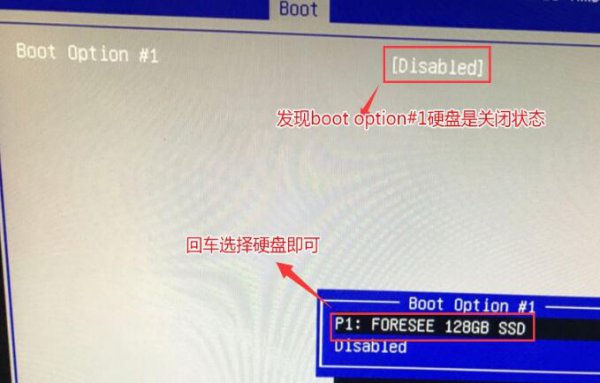
6、然后在此回到【Boot Optlon #1】选项,将硬盘设为启动第一项。
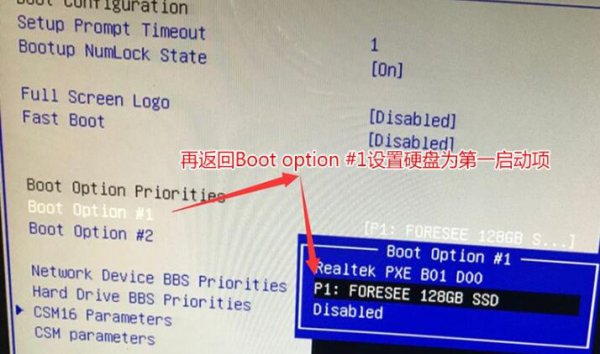
7、然后进行保存,在弹出的窗口中,点击【Yes】
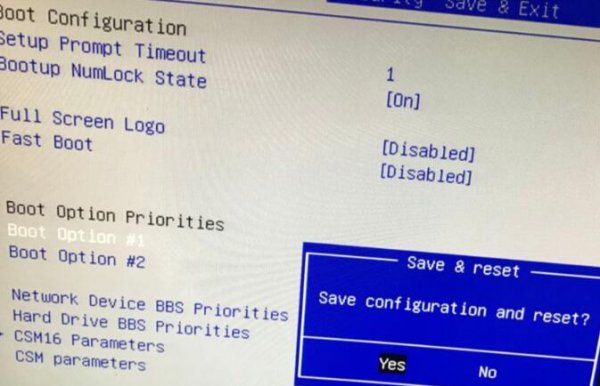
如果以上操作无法解决,请查看硬盘是否损坏。
以上IT袋网介绍的reboot and select proper boot device问题详细解决攻略教程的详细内容了,希望能给您带来帮助!


相关阅读
-
win11切换桌面窗口快捷键介绍 windows11快速切换窗口的快捷键
小编为你讲解win11切换桌面窗口快捷键介绍的电脑方面的小经验,关于win11切换桌面窗口快捷键介绍 跟 windows11快速切换窗口的快捷键,一起来了解了解吧。 win11为用户提供了一个多桌面模式,
-

系统之家win11安装方法 系统之家windows11安装教程
今日小编为你讲解系统之家win11安装方法的相关知识,关于 系统之家win11安装方法,一起来看看吧! 系统之家是不少的IT袋网友喜欢使用的系统下载地址,在win11正式推出后,一些用户就在这下
-
目前win10最稳定的版本是哪个 最适合打游戏的版本推荐
跟大家聊一聊目前win10最稳定的版本是哪个和最适合打游戏的版本推荐方面的内容,下面为详细的介绍。 现在win10系统是工作办公、家用娱乐的主流操作系统。Win10系统分了几个版本?怎么去选
-
win11把c盘移到d盘方法 可以把windows从c盘移到d盘吗
为网友们解答win11把c盘移到d盘方法的介绍,关于win11把c盘移到d盘方法 可以把windows从c盘移到d盘吗,接下来IT袋小编为大家介绍。 不少的IT袋网友想要通过把win11c盘软件移动到d盘来解放c盘空间