
win10更新2004卡住不动 win10升级更新2004版卡在49%解决办法(2)
win10升级更新2004版卡在49%解决办法
regsvr32.exe /s wintrust.dll
regsvr32.exe /s dssenh.dll
regsvr32.exe /s rsaenh.dll
regsvr32.exe /s gpkcsp.dll
regsvr32.exe /s sccbase.dll
regsvr32.exe /s slbcsp.dll
regsvr32.exe /s cryptdlg.dll
regsvr32.exe /s oleaut32.dll
regsvr32.exe /s ole32.dll
regsvr32.exe /s shell32.dll
regsvr32.exe /s initpki.dll
regsvr32.exe /s wuapi.dll
regsvr32.exe /s wuaueng.dll
regsvr32.exe /s wuaueng1.dll
regsvr32.exe /s wucltui.dll
regsvr32.exe /s wups.dll
regsvr32.exe /s wups2.dll
regsvr32.exe /s wuweb.dll
regsvr32.exe /s qmgr.dll
regsvr32.exe /s qmgrprxy.dll
regsvr32.exe /s wucltux.dll
regsvr32.exe /s muweb.dll
regsvr32.exe /s wuwebv.dll
Write-Host "7) Removing WSUS client settings..."
REG DELETE "HKLM\SOFTWARE\Microsoft\Windows\CurrentVersion\WindowsUpdate" /v AccountDomainSid /f
REG DELETE "HKLM\SOFTWARE\Microsoft\Windows\CurrentVersion\WindowsUpdate" /v PingID /f
REG DELETE "HKLM\SOFTWARE\Microsoft\Windows\CurrentVersion\WindowsUpdate" /v SusClientId /f
Write-Host "8) Resetting the WinSock..."
netsh winsock reset
netsh winhttp reset proxy
Write-Host "9) Delete all BITS jobs..."
Get-BitsTransfer | Remove-BitsTransfer
Write-Host "10) Attempting to install the Windows Update Agent..."
if($arch -eq 64){
wusa Windows8-RT-KB2937636-x64 /quiet
}
else{
wusa Windows8-RT-KB2937636-x86 /quiet
}
Write-Host "11) Starting Windows Update Services..."
Start-Service -Name BITS
Start-Service -Name wuauserv
Start-Service -Name appidsvc
Start-Service -Name cryptsvc
Write-Host "12) Forcing discovery..."
wuauclt /resetauthorization /detectnow
Write-Host "Process complete. Please reboot your computer."
3、忽略红字错误,重启电脑
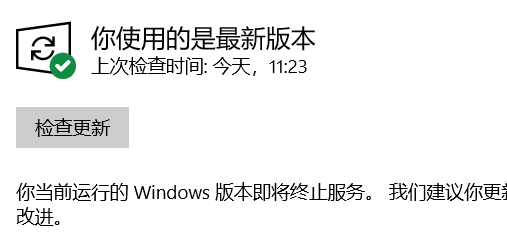
4、运行Windows Update即可正常运行。
上述分享的win10更新2004卡住不动 win10升级更新2004版卡在49%解决办法的全文内容,希望对网友有所帮助!
相关阅读
-

win10远程桌面未启用对服务器的远程访问 win10远程桌面由于以下原因之
跟大家说一说win10远程桌面由于以下原因之一无法连接到远程计算机的相关介绍,关于win10远程桌面由于以下原因之一无法连接到远程计算机,一起来了解了解吧。 由用户们在使用远程桌面的时
-
nvidia控制面板无法打开 nvidia控制面板打不开怎么办
为关注IT袋网的网友们详解nvidia控制面板打不开怎么办的介绍,关于nvidia控制面板无法打开 nvidia控制面板打不开怎么办,接下来一起来看看吧。 我们在使用电脑的时候,如果想要对视图界面进
-

win7窗口切换快捷键介绍 windows快捷键切换窗口
今日小编为你讲解win7窗口切换快捷键介绍的相关经验,关于win7窗口切换快捷键介绍 windows快捷键切换窗口,一起来看看吧! 快捷键能够帮助我们快速地操作电脑。当我们同时开启多个窗口时,
-
文件加密重装系统后打不开 重装系统后设备加密解决方法
正文核心介绍:重装系统后设备加密解决方法方面的知识,关于文件加密重装系统后打不开 重装系统后设备加密解决方法,一起跟随小编看看吧! 最近比较多的IT袋朋友在问小编重装系统后设