
0xc0000005怎么修复 0xc0000005错误修复解决方法(2)
导读:0xc0000005错误修复解决方法,4、再打开的窗口输入命令提示符: for %i in (%windir%\system32\*.dll) do regsvr32.exe /s %i 回车, 再输入: for %i in (%windir%\system32\*.ocx) do regsvr32.exe /s %i 重启即可。
0xc0000005错误修复解决方法
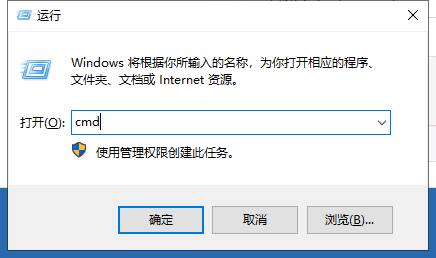
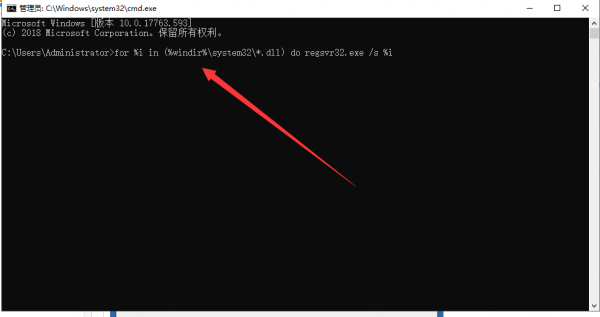
4、再打开的窗口输入命令提示符:
for %i in (%windir%\system32\*.dll) do regsvr32.exe /s %i回车,
再输入:for %i in (%windir%\system32\*.ocx) do regsvr32.exe /s %i重启即可。
上述分享的 0xc0000005错误修复解决方法的具体内容,未经允许禁止转载!

相关阅读
-
win10系统安装包在哪 新手自己用u盘装系统的方法
小编为网友们解答win10系统安装包在哪和新手自己用u盘装系统的方法方面的内容,接下来IT袋小编就来介绍。 这期给大家带来一期系统安装教程的方法,视频安装系统主要有两种方法,一种是
-

u盘ghost安装系统步骤 U盘安装Ghost版win10系统方法
这些知识你了解吗?U盘安装Ghost版win10系统方法的IT知识,关于u盘ghost安装系统步骤 U盘安装Ghost版win10系统方法,一起跟随小编看看吧! 在我们即将对自己的电脑进行系统重装的时候,部分IT袋
-
win10电脑蓝屏显示0x0000098怎么解决 电脑windows10系统蓝屏错误代码0xc00
本文导读:win10电脑蓝屏显示0x0000098怎么解决方面的介绍,关于 win10电脑蓝屏显示0x0000098怎么解决,下面为详细的介绍。 我们在使用win10操作系统电脑的时候,有些情况下可能会遇到出现电脑显
-

msdn哪个是win7纯净版 msdn我告诉你win7哪个是专业版
对于许多网友来说msdn我告诉你win7哪个是专业版方面的介绍,关于msdn哪个是win7纯净版 msdn我告诉你win7哪个是专业版,一定能解决您的问题的,一起来了解吧! 很多win7的用户在按装系统的时候