
SpringBoot使用Thymeleaf生成PDF
SpringBoot使用Thymeleaf生成PDF
您可能不了解SpringBoot使用Thymeleaf生成PDF的相关话题,接下来IT袋网小编为大家介绍。
在现代Web应用中,生成PDF文件是一个常见的需求。
为了满足这一需求,我们可以利用Spring Boot集成Thymeleaf和Flying Saucer PDF来生成具有丰富内容的PDF文件。
Thymeleaf作为模板引擎,提供了简单而强大的模板语法,而Flying Saucer PDF则是一个用于将HTML转换为PDF的工具
1. 选择Thymeleaf和Flying Saucer的原因
Thymeleaf的强大模板引擎
Thymeleaf是一款为HTML和XML文档提供自然模板语法的模板引擎。
它的语法清晰简单,易于学习和使用,同时支持强大的逻辑操作。与Spring Boot紧密集成,使得在Spring Boot应用中使用Thymeleaf非常方便。
Flying Saucer PDF的HTML转PDF能力
Flying Saucer PDF是一个用于将HTML和CSS转换为PDF的Java库。它支持CSS2.1和部分CSS3,因此我们可以使用Thymeleaf生成的HTML作为输入,从而实现更丰富的PDF内容
2. 代码实现步骤
完整项目结构如下:
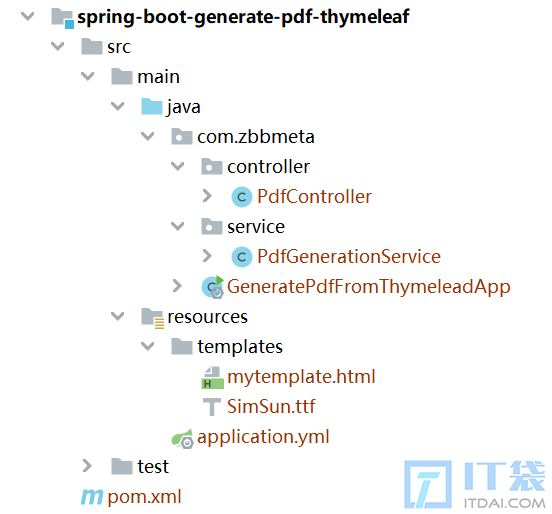
【步骤一】:在pom.xml中添加依赖
<?xml version="1.0" encoding="UTF-8"?>
<project xmlns="http://maven.apache.org/POM/4.0.0"
       xmlns:xsi="http://www.w3.org/2001/XMLSchema-instance"
       xsi:schemaLocation="http://maven.apache.org/POM/4.0.0 http://maven.apache.org/xsd/maven-4.0.0.xsd">
    <parent>
        <artifactId>spring-boot-starter-parent</artifactId>
        <groupId>org.springframework.boot</groupId>
        <version>2.7.15</version>
    </parent>
  <modelVersion>4.0.0</modelVersion>
  <artifactId>spring-boot-generate-pdf-thymeleaf</artifactId>
  <properties>
      <maven.compiler.source>11</maven.compiler.source>
      <maven.compiler.target>11</maven.compiler.target>
  </properties>
  <dependencies>
      <dependency>
          <groupId>org.springframework.boot</groupId>
          <artifactId>spring-boot-starter-web</artifactId>
      </dependency>
      <dependency>
          <groupId>org.springframework.boot</groupId>
          <artifactId>spring-boot-starter-test</artifactId>
      </dependency>
      <!-- Spring Boot Starter Thymeleaf -->
      <dependency>
          <groupId>org.springframework.boot</groupId>
          <artifactId>spring-boot-starter-thymeleaf</artifactId>
      </dependency>
      <!-- Flying Saucer PDF -->
      <dependency>
          <groupId>org.xhtmlrenderer</groupId>
          <artifactId>flying-saucer-pdf</artifactId>
          <version>9.3.1</version>
      </dependency>
  </dependencies>
</project>
【步骤二】:在yml中添加thymeleaf配置

相关阅读
-

excel怎么添加行列 excel表格添加行列
文章摘要:excel怎么添加行列的生活小经验,关于excel怎么添加行列 excel表格添加行列,如有不对的地方欢迎指正! 总结: 第一种方法,1、打开需要添加行的表格。2、以张三为例添加行,选中
-

pdf保存成图片格式 免费将图片转为pdf的软件推荐
IT袋网为你介绍pdf保存成图片格式和免费将图片转为pdf的软件推荐的相关话题,一起跟随小编看看吧! 有人看到这个问题可能会说“:不就是截个图的事情吗,看起来也不是很难的样子。” 但
-

excel有单位怎么求和 excel有kg 有g怎么求和
本文为你详解excel有kg,有g怎么求和方面的讲解,关于excel有单位怎么求和 excel有kg,有g怎么求和,一起来了解了解吧。 图文步骤: 1、打开excel表格,输入下图中的内容。 2、将kg的数据换算成g,
-
wps怎样在图片上加水印 wps加水印文字在图片上方法
正文核心介绍:wps加水印文字在图片上方法的相关话题,关于wps加水印文字在图片上方法 或者 wps怎样在图片上加水印,请看下面详细的介绍。 我们如果想要保护自己的图片版权,就可以将水