
Ubuntu开机卡在A start job is runing解决方法
Ubuntu开机卡在A
今天为大家介绍Ubuntu开机卡在A的相关话题,下面IT袋网为您详细介绍
安装ubuntu20.04 LTS系统后,开机卡在“A start job is running for wait for network to be Configured”等待连接两分多钟。(启动作业正在运行,等待配置网络)
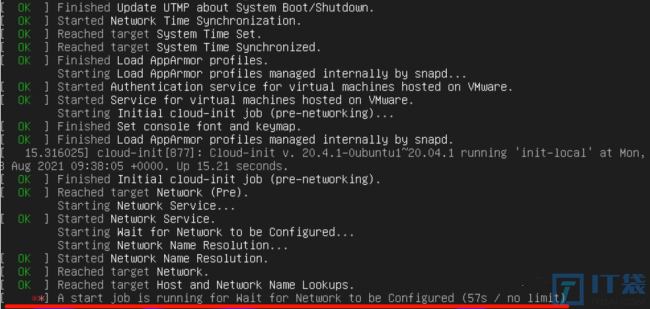
解决办法:
1、进入该目录下,修改配置文件。
weijishu@ubuntu:~$ cd /etc/systemd/system/network-online.target.wants/2、在[Service]下添加 TimeoutStartSec=2sec,(设置超时时间为2秒)如下:
weijishu@ubuntu:/etc/systemd/system/network-online.target.wants
$ sudo nano systemd-networkd-wait-online.service
[Service]
Type=oneshot
ExecStart=/lib/systemd/systemd-networkd-wait-online
RemainAfterExit=yes
TimeoutStartSec=2sec
3、重启验证
sudo rebootswap相关报错,启动必须等1分30秒。
a start job is running for /dev/disk/by-uuid/xxxxx.(20s / 1 min 30 s )1、解决
1.1 查看交换分区挂载情况:
swapon --show1.2 查看交换分区情况:
sudo blkid1.3 然后再查看/etc/fstab文件中swap分区的UUID。
sudo cat /etc/fstab两个UUID不同,正好解释了为什么swap分区会挂载失败。
解决方法是删除/etc/fstab文件中swap分区的UUID,
再用sudo blkid命令得出的swap分区UUID替换。保存文件,重启系统后a start job is running for
dev-disk-by这个错误就消失了。
2、解决
2.1 修改/etc/fstab文件,注掉swap那一行
weijishu@ubuntu:/path
$ sudo cat /etc/fstab
# /etc/fstab: static file system information.
## Use 'blkid' to print the universally unique identifier for a# device; this may be used with UUID= as a more robust way to name device# that works even if disks are added and removed. See fstab(5).
## <file system> <mount point>   <type>  <options>       <dump><pass>
# / was on /dev/sda2 during curtin installation/dev/disk/by-uuid/cxxxx06-xxxxc-4xxxx0-xxxxx80-xxxxxxxaac / ext4 defaults 0 1#/swap.img      none    swap    sw      0       0
2.2 重启不让加载swap分区,即可解决此报错
sudo reboot设置等待时间的原因是为了给系统提供足够的时间来完成启动过程中一些必要的工作,如网络配置、服务启动等。
如果系统在启动过程中遇到问题,等待时间可以给系统提供足够的时间来尝试解决问题,避免系统在遇到问题时立即崩溃或无法正常启动。
同时,等待时间也可以保证系统在启动完成后能够及时提供服务,提高系统的可用性和可靠性。
但是,如果等待时间过长,会导致系统启动时间过长,影响用户体验。
因此,需要根据实际情况设置合理的等待时间,以保证系统的正常启动和运行。
上述就是Ubuntu开机卡在A 跟 start的全面方法讲解,希望为您起一个抛砖引玉袋作用,能解决您生活中的问题吧。
相关阅读
-
win10系统配置要求 能装win10系统的最好电脑配置
为大家介绍win10系统配置要求和能装win10系统的最好电脑配置的教程内容,继续往下看吧! 微软宣布推出win11时,本以为win10的“霸主”地位要被占据了。但是win11似乎有些许“不靠谱”,动不动
-
交通掉头规则与红灯 解答掉头时是否需要等待红灯信号
今天带来的生活小经验解答掉头时是否需要等待红灯信号和交通掉头规则与红灯方面的经验,下面为详细的介绍。 交通掉头规则与红灯 交通掉头是日常生活中常见的交通行为,掉头时需要注意
-

u盘有一个文件夹一直删不掉不能去只读怎么办win7
跟大家说一说u盘有一个文件夹一直删不掉不能去只读怎么办win7方面的讲解,下面来一起了解一下吧。 在使用U盘存储文件时,我们经常会遇到U盘文件夹无法删除,或者只读的问题。这些问题往
-

win10桌面图标字体大小怎么调整 电脑图标字体大小的设置
一篇方法教程,与您分享win10桌面图标字体大小怎么调整和电脑图标字体大小的设置方面的内容,接下来一起来看看吧。 我们平时使用的电脑桌面图标大小其实是可以调节的,有些图标是因为