
Linux 60秒快速性能分析操作手册
导读:Linux,为大家说一说Linux方面的内容,很不错的方法小知识,建议收藏哦! Linux 60秒分析 下面这个清单适用于任何性能问题的分析工作,也反映了笔者在实际工作中,当登录到一
Linux
为大家说一说Linux方面的内容,很不错的方法小知识,建议收藏哦!
Linux 60秒分析
下面这个清单适用于任何性能问题的分析工作,也反映了笔者在实际工作中,当登录到一台表现不佳的 Linux 系统中后,在最初60秒内通常会进行的操作。
uptimedmesg | tail && cat /var/log/messagesvmstat 1mpstat -P ALL 1pidstat 1iostat -xz 1free -msar -n DEV 1sar -n tcp,ETCP 1sar -n SOCK 1 3top
uptime
uptime 命令用于显示系统已运行的时间,并提供系统负载平均值的信息。以下是 uptime 命令提供的信息解释:
┌──[liruilong@liruilongs.github.io]-[~]
└─$man uptime
UPTIME(1)                                           User Commands                                           UPTIME(1)
NAME
       uptime - Tell how long the system has been running.
SYNOPSIS
       uptime [options]
DESCRIPTION
       uptime  gives a one line display of the following information.  The current time, how long the system has been
       running, how many users are currently logged on, and the system load averages for the past 1, 5, and  15  min‐
       utes.
       This is the same information contained in the header line displayed by w(1).
       System  load  averages  is  the  average  number of processes that are either in a runnable or uninterruptable
       state.  A process in a runnable state is either using the CPU or waiting to use the CPU.  A process  in  unin‐
       terruptable  state is waiting for some I/O access, eg waiting for disk.  The averages are taken over the three
       time intervals.  Load averages are not normalized for the number of CPUs in a system, so a load average  of  1
       means a single CPU system is loaded all the time while on a 4 CPU system it means it was idle 75% of the time.
       ......................................
uptime 可以快速查看当前系统时间以及运行时间,总的登录用户, 以及平均负载:
- 当前时间:显示执行uptime命令时的系统当前时间。
- 系统运行时间:显示系统自上次引导或重新启动以来的运行时间。以”X天X小时X分钟”的格式显示。
- 用户数量:表示当前登录到系统的用户数量。
- 系统负载平均值:显示过去1分钟、5分钟和15分钟的系统负载平均值。负载平均值代表处于运行状态或等待运行状态的平均进程数量。它指示系统的活动水平和资源利用程度。负载平均值并不针对系统中的CPU核数进行归一化
┌──[root@vms100.liruilongs.github.io]-[~]
└─$uptime
 11:14:26 up 16 min,  1 user,  load average: 21.37, 18.64, 16.25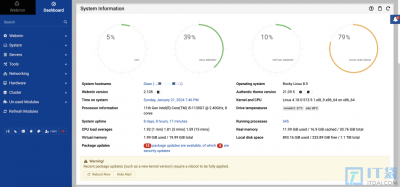
相关阅读
-
win11密码设置教程 win 11系统怎么设密码
正文核心介绍:win11密码设置教程的相关话题,关于win11密码设置教程 win 11系统怎么设密码,接下来就是全面介绍。 更新了新的win11系统之后许多求稳的小伙伴第一时间就会给电脑设置一个密码
-
windows11从哪里下载 win11纯净版下载位置及教程
跟大家说一说win11纯净版下载位置及教程方面的知识,关于windows11从哪里下载 win11纯净版下载位置及教程,接下来IT袋小编就来介绍。 纯净版的系统是不少的IT袋网友都喜欢使用的,因为它没有
-
win10 卓越性能设置 win101909怎么开启卓越性能模式
为大家分享win101909怎么开启卓越性能模式方面的讲解,关于win10 卓越性能设置 win101909怎么开启卓越性能模式,相关内容具体如下: 在微软更新了win101909后,有很多新功能,其中的高性能模式,
-

华为手机北斗导航如何开启 打开北斗定位系统方法
文章摘要:华为手机北斗导航如何开启和打开北斗定位系统方法的介绍,如有不对的地方欢迎指正! 从车道级导航到北斗创新应用,高精度成为全球卫星导航发展热点。 2 月 18 日,千寻位置与