
Java项目商品管理系统 Java产品管理系统(5)
Java项目商品管理系统
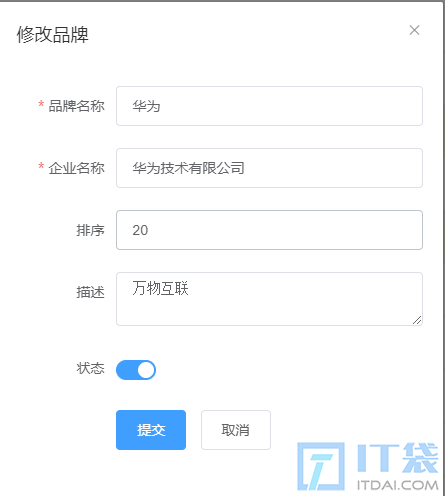
上图是修改数据的对话框,当点击提交按钮后就需要将数据提交到后端,并将数据保存到数据库中。
后端实现
1、在 BrandMapper 接口中定义 updateBrand() 方法
@Update("update tb_brand set brand_name = #{brandName},company_name = #{companyName},ordered = #{ordered},description = #{description},status = #{status} where id = #{id};")
void updateBrand(Brand brand);
2、在 BrandService 接口中定义
void updateBrand(Brand brand);3、在 BrandServiceImpl 类中重写 updateBrand() 方法,并进行业务逻辑实现
/**
     * 修改数据
     * @param brand
*/
@Override
public void updateBrand(Brand brand) {
    //获取连接
    SqlSession sqlSession = MyBatisUtils.openSession();
    BrandMapper mapper = sqlSession.getMapper(BrandMapper.class);
    //调用修改方法
    mapper.updateBrand(brand);
    sqlSession.commit();
    sqlSession.close();
}
4、在 web 包写定义名为 BrandUpdateServlet 的 Servlet。该 Servlet 的逻辑如下:
@WebServlet(value = "/brand/update")
public class BrandUpdateServlet extends HttpServlet {
    @Override
    protected void doGet(HttpServletRequest request, HttpServletResponse response) throws ServletException, IOException {
        //接受数据
        String BrandJson = request.getReader().readLine();
        //将json数据转化为对象
        Brand brand = JSON.parseObject(BrandJson, Brand.class);
        //创建对象调用修改方法
        BrandService brandService = new BrandServiceImpl();
        brandService.updateBrand(brand);
        //响应数据 success
        response.setContentType("text/json;charset=utf-8");
        response.getWriter().write("success");
    }
    @Override
    protected void doPost(HttpServletRequest request, HttpServletResponse response) throws ServletException, IOException {
        request.setCharacterEncoding("UTF-8");
        doGet(request,response);
    }
}
前端代码实现
submitFormUpdate(formName) {
    // 1.点击提交按钮,发送ajax请求,携带表单数据
    axios.post("brand/update", this.updateBrand)
        .then(resp => {
        // 2.获取数据,判断修改是否成功
        if (resp.data == "success") {
            // 关闭窗口
            this.updateDialogVisible = false;
            // 重新加载数据
            this.reselectAll();
            // 给一个成功的提示
            this.$message({
                message: '恭喜你,修改品牌成功!',
                type: 'success'
            });
            // 清空模型数据,否则还显示上一次的
            this.updateBrand = {
                brandName: '',
                companyName: '',
                ordered: '',
                description: '',
                status: 0
            }
        }
    });
}
4.4、删除数据功能
后端实现
后端实现
1、在 BrandMapper 接口中定义 deleteBrand() 方法
@Delete("delete from tb_brand where id = #{id}")
void deleteBrand(int id);
2、在 BrandService 接口中定义
void deleteBrand(int index);3、在 BrandServiceImpl 类中重写 deleteBrand() 方法,并进行业务逻辑实现
/**
     * 删除数据
     * @param index
*/
@Override
public void deleteBrand(int index) {
    //获取连接
    SqlSession sqlSession = MyBatisUtils.openSession();
    BrandMapper mapper = sqlSession.getMapper(BrandMapper.class);
    //调用方法
    mapper.deleteBrand(index);
    sqlSession.commit();
    sqlSession.close();
}
4、在 web 包写定义名为 BrandDeleteServlet 的 Servlet。该 Servlet 的逻辑如下:
@WebServlet(value = "/brand/deleteOne")
public class BrandDeleteServlet extends HttpServlet {
    @Override
    protected void doGet(HttpServletRequest request, HttpServletResponse response) throws ServletException, IOException {
        //获取数据id
        String id = request.getParameter("id");
        int index = Integer.parseInt(id);
        //调用删除方法
        BrandService brandService = new BrandServiceImpl();
        brandService.deleteBrand(index);
        //响应数据  success
        response.setContentType("text/json;charset=utf-8");
        response.getWriter().write("success");
    }
    @Override
    protected void doPost(HttpServletRequest request, HttpServletResponse response) throws ServletException, IOException {
        request.setCharacterEncoding("UTF-8");
        doGet(request,response);
    }
}
前端代码实现
// 删除品牌
handleDelete(index, row) {
    this.$confirm('此操作将永久删除选中的品牌, 是否继续?', '警告', {
        confirmButtonText: '确定',
        cancelButtonText: '取消',
        type: 'warning'
    }).then(() => {
        // 根据id删除一个品牌
        axios.post("brand/deleteOne", "id=" + row.id)
            .then(resp => {
            if (resp.data == "success") {
                // 重新加载数据
                this.reselectAll();
                // 给一个成功的提示
                this.$message({
                    message: '恭喜你,删除品牌成功!',
                    type: 'success'
                });
            }
        });
    }).catch(() => {
        this.$message({
            type: 'info',
            message: '已取消删除'
        });
    });
}
4.5、批量删除功能
如上图所示点击多条数据前的复选框就意味着要删除这些数据,而点击了 批量删除 按钮后,需要让用户确认一下,因为有可能是用户误操作的,当用户确定后需要给后端发送请求并携带者需要删除数据的多个id值,后端程序删除数据库中的数据。
具体的流程如下:
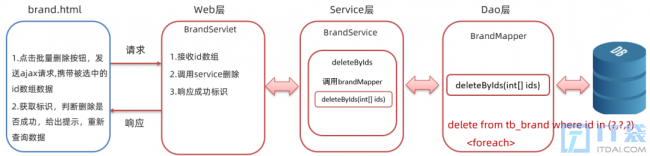
==注意:==
前端发送请求时需要将要删除的多个id值以json格式提交给后端,而该json格式数据如下:
[1,2,3,4]后端实现
1、BrandMapper接口中定义deleteByIds()添加方法,由于这里面要用到动态 sql ,属于复杂的sql操作,建议使用映射配置文件。
接口方法声明如下:
 /**
     * 批量删除
     * @param ids
     */
void deleteByIds(@Param("ids") int[] ids);
在 BrandMapper.xml 映射配置文件中添加 statement
<delete id="deleteByIds">
    delete from tb_brand where id in
    <foreach collection="ids" item="id" separator="," open="(" close=")">
        #{id}
    </foreach>
</delete>
2、在 BrandService 接口中定义 deleteByIds() 批量删除的业务逻辑方法
/**
     * 批量删除
     * @param ids
     */
void deleteByIds( int[] ids);
3、在 BrandServiceImpl 类中重写 deleteByIds() 方法,并进行业务逻辑实现
@Override
public void deleteByIds(int[] ids) {
    //2. 获取SqlSession对象
    SqlSession sqlSession = factory.openSession();
    //3. 获取BrandMapper
    BrandMapper mapper = sqlSession.getMapper(BrandMapper.class);
    //4. 调用方法
    mapper.deleteByIds(ids);
    sqlSession.commit();//提交事务
    //5. 释放资源
    sqlSession.close();
}4、在BrandServlet类中定义deleteByIds()方法。而该方法的逻辑如下:
- 接收页面提交的数据。页面到时候提交的数据是 json 格式的数据,所以此处需要使用输入流读取数据
- 接收页面提交的数据。页面到时候提交的数据是 json 格式的数据,所以此处需要使用输入流读取数据
- 将接收到的数据转换为
int[]数组 - 调用 service 的
deleteByIds()方法进行批量删除的业务逻辑处理 - 给浏览器响应添加成功的标识,这里直接给浏览器响应
success字符串表示成功
servlet 中 deleteByIds() 方法代码实现如下:
@WebServlet(value = "/brand/deleteByIds")
public class deleteByIdsServlet extends HttpServlet {
    @Override
    protected void doGet(HttpServletRequest request, HttpServletResponse response) throws ServletException, IOException {
       // 接受数据
        String idJson = request.getReader().readLine();
        //将json数据转化为数组
        int[] ints = JSON.parseObject(idJson, int[].class);
        //调用方法
        BrandService brandService = new BrandServiceImpl();
        brandService.deleteByIds(ints);
        //响应数据
        response.setContentType("text/json;charset=utf-8");
    }
    @Override
    protected void doPost(HttpServletRequest request, HttpServletResponse response) throws ServletException, IOException {
        request.setCharacterEncoding("UTF-8");
        doGet(request,response);
    }
}
前端代码
此功能的前端代码实现稍微有点麻烦,分为以下几步实现
1、获取选中的id值
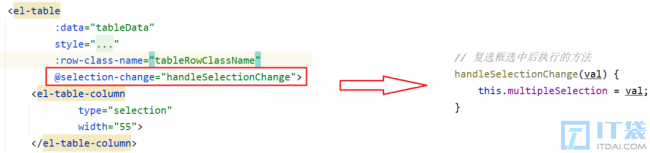
从上图可以看出表格复选框绑定了一个 selection-change 事件,该事件是当选择项发生变化时会触发。
该事件绑定了 handleSelectionChange 函数,而该函数有一个参数 val ,该参数是获取选中行的数据,如下
相关阅读
-
玩游戏的win11系统 win11打游戏的性能介绍
相对于大多数人win11打游戏的性能介绍的话题,关于玩游戏的win11系统 win11打游戏的性能介绍,继续往下看吧! 游戏性能是当前比较多的IT袋朋友在选择操作系统时非常关注的一点,最近win11的
-
电脑出现0x000000ed怎么办 0x00000ed xp系统解决教程
今天小编详解0x00000ed xp系统解决教程方面的内容,关于电脑出现0x000000ed怎么办 0x00000ed xp系统解决教程,接下来一起来看看吧。 xp系统是一款非常老旧的系统,虽然还是有一些用户在使用,但是
-
win10查看电脑配置命令 了解查看自己电脑的配置信息
小编为你讲解win10查看电脑配置命令和了解查看自己电脑的配置信息的电脑小知识,相关内容具体如下: 你是否了解自己的系统配置呢?如果用户使用的操作系统是win10系统?今天就为大家介绍
-
win10如何升级win10系统教程 教你看电脑的配置跟型号
IT袋网小编为你介绍win10如何升级win10系统教程和教你看电脑的配置跟型号的IT知识,接下来小编为网友介绍。 微软声明不再对win10系统支持后,很多win10系统的用户都将自己的系统升级到win10进