
Java项目商品管理系统 Java产品管理系统(7)
Java项目商品管理系统

上图就是用来输入条件查询的条件数据的。要做条件查询功能,先明确以下三个问题
- 3个条件之间什么关系?同时满足,所用 SQL 中多个条件需要使用 and 关键字连接
- 3个条件必须全部填写吗?不需要。想根据哪儿个条件查询就写那个,所以这里需要使用动态 sql 语句
- 条件查询需要分页吗?需要
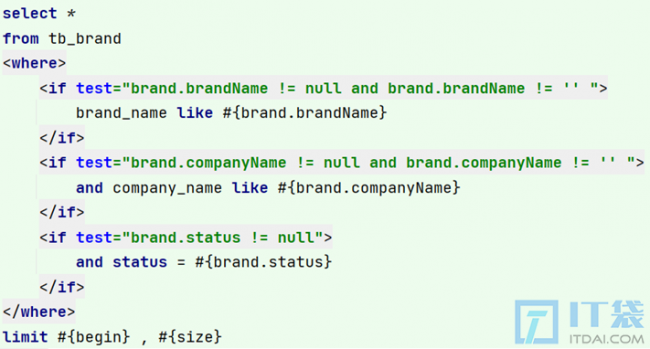
根据上面三个问题的明确,我们就可以确定sql语句了:
整个条件分页查询流程如下
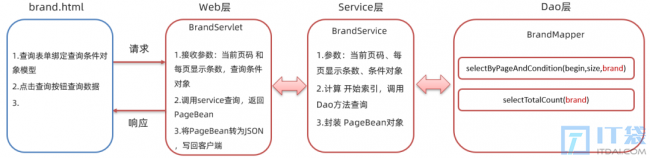
后端实现
1、在 BrandMapper 接口中定义 selectByPageAndCondition() 方法 和 selectTotalCountByCondition 方法
/**
     * 分页条件查询
     * @param begin
     * @param size
     * @return
*/
List<Brand> selectByPageAndCondition(@Param("begin") int begin,@Param("size") int size,@Param("brand") Brand brand);
/**
     * 根据条件查询总记录数
     * @return
*/
int selectTotalCountByCondition(Brand brand);
参数:
begin分页查询的起始索引size分页查询的每页条目数brand用来封装条件的对象
由于这是一个复杂的查询语句,需要使用动态sql;所以我们在映射配置文件中书写 sql 语句。brand_name 字段和 company_name 字段需要进行模糊查询,所以需要使用 % 占位符。映射配置文件中 statement 书写如下:
<!--查询满足条件的数据并进行分页-->
<select id="selectByPageAndCondition" resultMap="brandResultMap">
    select *
    from tb_brand
    <where>
        <if test="brand.brandName != null and brand.brandName != '' ">
            and  brand_name like #{brand.brandName}
        </if>
        <if test="brand.companyName != null and brand.companyName != '' ">
            and  company_name like #{brand.companyName}
        </if>
        <if test="brand.status != null">
            and  status = #{brand.status}
        </if>
    </where>
    limit #{begin} , #{size}
</select>
<!--查询满足条件的数据条目数-->
<select id="selectTotalCountByCondition" resultType="java.lang.Integer">
    select count(*)
    from tb_brand
    <where>
        <if test="brandName != null and brandName != '' ">
            and  brand_name like #{brandName}
        </if>
        <if test="companyName != null and companyName != '' ">
            and  company_name like #{companyName}
        </if>
        <if test="status != null">
            and  status = #{status}
        </if>
    </where>
</select>
2、在 BrandService 接口中定义 selectByPageAndCondition() 分页查询数据的业务逻辑方法
 /**
     * 分页条件查询
     * @param currentPage
     * @param pageSize
     * @param brand
     * @return
*/
PageBean<Brand>  selectByPageAndCondition(int currentPage,int pageSize,Brand brand);
3、在 BrandServiceImpl 类中重写 selectByPageAndCondition() 方法,并进行业务逻辑实现
@Override
public PageBean selectByPageAndCondition(int currentPage, int pageSize, Brand brand) {
    int start = (currentPage - 1) * pageSize;
    //获取连接
    SqlSession sqlSession = MyBatisUtils.openSession();
    BrandMapper mapper = sqlSession.getMapper(BrandMapper.class);
    //调用方法,查询条件总数
    int selectByPageTotal = mapper.selectByPageAndConditionTotal(brand);
    //调用方法查询页面数据
    List<Brand> brands = mapper.selectByPageAndCondition(start,pageSize,brand);
    sqlSession.close();
    //封装数据
    PageBean pageBean = new PageBean(selectByPageTotal,brands);
    return pageBean;
}4、在BrandServlet类中定义selectByPageAndCondition()方法。而该方法的逻辑如下:
- 获取页面提交的
当前页码和每页显示条目数两个数据。这两个参数是在url后进行拼接的,格式是url?currentPage=1&pageSize=5。获取这样的参数需要使用requet.getparameter()方法获取。 - 获取页面提交的
条件数据,并将数据封装到一个Brand对象中。由于这部分数据到时候是需要以 json 格式进行提交的,所以我们需要通过流获取数据,具体代码如下:
// 获取查询条件对象
BufferedReader br = request.getReader();
String params = br.readLine();//json字符串
//转为 Brand
Brand brand = JSON.parseObject(params, Brand.class);- 调用 service 的
selectByPageAndCondition()方法进行分页查询的业务逻辑处理 - 将查询到的数据转换为 json 格式的数据
- 响应 json 数据
servlet 中 selectByPageAndCondition() 方法代码实现如下:
@WebServlet(value = "/brand/selectByPageAndCondition")
public class SelectByPageAndCondition extends HttpServlet {
    @Override
    protected void doGet(HttpServletRequest request, HttpServletResponse response) throws ServletException, IOException {
        //获取数据
        String currentPageStr = request.getParameter("currentPage");
        String pageSizeStr = request.getParameter("pageSize");
        String brandName = request.getParameter("brandName");
        String companyName = request.getParameter("companyName");
        String status = request.getParameter("status");
        int currentPage = Integer.parseInt(currentPageStr);
        int pageSize = Integer.parseInt(pageSizeStr);
        //封装数据
        Brand brand = new Brand();
        brand.setBrandName(brandName);
        brand.setCompanyName(companyName);
        if (status != null && status.length() > 0){
            int i = Integer.parseInt(status);
            brand.setStatus(i);
        }
        //调用查询
        BrandService brandService = new BrandServiceImpl();
        PageBean pageBean = brandService.selectByPageAndCondition(currentPage,pageSize,brand);
        //转化为json
        String jsonString = JSON.toJSONString(pageBean);
        //设置响应
        response.setContentType("text/json;charset=utf-8");
        response.getWriter().write(jsonString);
    }
    @Override
    protected void doPost(HttpServletRequest request, HttpServletResponse response) throws ServletException, IOException {
        request.setCharacterEncoding("UTF-8");
        doGet(request,response);
    }
}
前端代码
前端代码我们从以下几方面实现:
1.查询表单绑定查询条件对象模型
这一步在页面上已经实现了,页面代码如下:


相关阅读
-
玩游戏的win11系统 win11打游戏的性能介绍
相对于大多数人win11打游戏的性能介绍的话题,关于玩游戏的win11系统 win11打游戏的性能介绍,继续往下看吧! 游戏性能是当前比较多的IT袋朋友在选择操作系统时非常关注的一点,最近win11的
-
电脑出现0x000000ed怎么办 0x00000ed xp系统解决教程
今天小编详解0x00000ed xp系统解决教程方面的内容,关于电脑出现0x000000ed怎么办 0x00000ed xp系统解决教程,接下来一起来看看吧。 xp系统是一款非常老旧的系统,虽然还是有一些用户在使用,但是
-
win10查看电脑配置命令 了解查看自己电脑的配置信息
小编为你讲解win10查看电脑配置命令和了解查看自己电脑的配置信息的电脑小知识,相关内容具体如下: 你是否了解自己的系统配置呢?如果用户使用的操作系统是win10系统?今天就为大家介绍
-
win10如何升级win10系统教程 教你看电脑的配置跟型号
IT袋网小编为你介绍win10如何升级win10系统教程和教你看电脑的配置跟型号的IT知识,接下来小编为网友介绍。 微软声明不再对win10系统支持后,很多win10系统的用户都将自己的系统升级到win10进