
Ansible安装配置和基本使用(2)
导读:Ansible安装配置和基本使用,1.2 编译安装 yum -y install python-jinja2 PyYAML python-paramiko python-babel python-crypto# 需要提前安装Python环境(略)wget https://releases.ansible.com/ansible/ansible-2.9.27.tar.gztar x
Ansible安装配置和基本使用
1.2 编译安装
yum -y install python-jinja2 PyYAML python-paramiko python-babel python-crypto
# 需要提前安装Python环境(略)
wget https://releases.ansible.com/ansible/ansible-2.9.27.tar.gz
tar xf ansible-2.9.27.tar.gz
cd ansible-2.9.27
ls -al
total 160
drwxr-xr-x  2 root root  4096 May 25 05:18 bin
drwxr-xr-x  2 root root  4096 May 25 05:18 changelogs
drwxr-xr-x  3 root root  4096 May 25 05:18 contrib
-rw-r--r--  1 root root 35148 May 25 05:18 COPYING
drwxr-xr-x  6 root root  4096 May 25 05:18 docs
drwxr-xr-x  3 root root  4096 May 25 05:18 examples
drwxr-xr-x  3 root root  4096 May 25 05:18 hacking
drwxr-xr-x  3 root root  4096 May 25 05:18 lib
drwxr-xr-x  2 root root  4096 May 25 05:18 licenses
-rw-r--r--  1 root root 13840 May 25 05:18 Makefile
-rw-r--r--  1 root root  1731 May 25 05:18 MANIFEST.in
drwxr-xr-x 10 root root  4096 May 25 05:18 packaging
-rw-r--r--  1 root root  7724 May 25 05:18 PKG-INFO
-rw-r--r--  1 root root  5175 May 25 05:18 README.rst
-rw-r--r--  1 root root   351 May 25 05:18 requirements.txt
-rw-r--r--  1 root root 12949 May 25 05:18 setup.py
-rw-r--r--  1 root root 28352 May 25 05:18 SYMLINK_CACHE.json
drwxr-xr-x  7 root root  4096 May 25 05:18 test
python setup.py build
python setup.py install
mkdir /etc/ansible
cp -r examples/* /etc/ansible
1.3 Git 源码安装
git clone https://github.com/ansible/ansible.git
cd ansible
git checkout stable-2.9
Updating files: 100% (19674/19674), done.
Branch 'stable-2.9' set up to track remote branch 'stable-2.9' from 'origin'.
Switched to a new branch 'stable-2.9'
source ./hacking/env-setup
1.4 pip安装
yum install python-pip python-devel
yum install gcc glibc-devel zibl-devel rpm-bulid openss1-devel
pip install -U pip
pip install ansible --upgrade
二、Ansible相关文件说明
2.1 配置文件
/etc/ansible/ansible.cfg:主配置文件,配置ansible工作特性;/etc/ansible/hosts:主机清单文件,管理的目标主机地址清单;/etc/ansible/roles/: 存放角色的目录。
2.2 主配置文件介绍
[defaults]
#inventory = /etc/ansible/hosts		# 主机列表配置文件
#library =/usr/share/my_modules/	# 库文件存放目录
#remote_tmp = $HOME/.ansible/tmp	# 临时py命令文件存放在远程主机目录
#local_tmp = $HOME/.ansible/tmp		# 本机的临时命令执行目录
#forks = 5				                # 默认并发数
#sudo_user = root			            # 默认sudo用户
#ask_sudo_pass = True			        # 每次执行ansible命令是否询间ssh密码
#ask_pass = True                  # 是否询问密码
#remote_port = 22                 # 默认的远程登录端口
host_key_checking = False		      # 检查对应服务器的host_key,建议取消注释
log_path=/var/log/ansible.log		  # 日志文件,建议启用
#module_name = command			      # 默认模块,可以修改为shell模块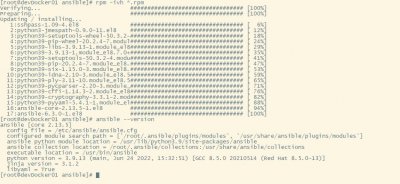

相关阅读
-

windows101809版本 windows1019587版本更新了什么
IT袋网小编为你介绍windows1019587版本更新了什么的介绍,关于windows101809版本 windows1019587版本更新了什么,继续往下看吧! 就在微软公司推出了win10系统之后,也是在不断的更新升级新的系统。那
-

win7低配精简版 低配电脑装win7比较好流畅的版本介绍
小编带来的是低配电脑装win7比较好流畅的版本介绍的方法内容,关于win7低配精简版 低配电脑装win7比较好流畅的版本介绍,接下来就是全面介绍。 如果我们目前使用的电脑配置情况比较低的话
-
win10兼容性视图设置教程 microsoft浏览器怎么设置兼容性视图
小编为大家讲一讲win10兼容性视图设置教程的内容,关于win10兼容性视图设置教程 microsoft浏览器怎么设置兼容性视图,接下来IT袋小编为大家介绍。 在win10系统中使用ie浏览器的用户都会需要使
-

windows10镜像文件在哪里下载 win10系统2004版本镜像在哪下载
如果想了解win10系统2004版本镜像在哪下载方面的内容,关于windows10镜像文件在哪里下载 win10系统2004版本镜像在哪下载,相关内容具体如下: 最近比较多的IT袋朋友们用上了win10 2004版本系统,剩