
Ansible安装配置和基本使用
导读:Ansible安装配置和基本使用,为网友解答Ansible安装配置和基本使用方面的内容,具体内容如下: 一、Ansible安装 Ansible的安装方法主要有以下四种: 1.1 yum使用EPEL源安装 mv /etc/yum.repos.d/epel.repo /etc/yum
Ansible安装配置和基本使用
为网友解答Ansible安装配置和基本使用方面的内容,具体内容如下:
一、Ansible安装
Ansible的安装方法主要有以下四种:
1.1 yum使用EPEL源安装
mv /etc/yum.repos.d/epel.repo /etc/yum.repos.d/epel.repo.backup
mv /etc/yum.repos.d/epel-testing.repo /etc/yum.repos.d/epel-testing.repo.backup
wget -O /etc/yum.repos.d/epel.repo https://mirrors.aliyun.com/repo/epel-7.repo
yum clean all && yum makecache
# 可以使用以下三种方式查看ansible包的信息
yum info ansible
yum list ansible
yum list | grep ansible
ansible.noarch                                                      2.9.27-1.el7                                                  epel
ansible-collection-microsoft-sql.noarch                             1.1.0-1.el8                                                   AppStream
ansible-collection-redhat-rhel_mgmt.noarch                          1.0.0-2.el8                                                   AppStream
ansible-doc.noarch                                                  2.9.27-1.el7                                                  epel
ansible-freeipa.noarch                                              0.3.8-1.el8                                                   AppStream
ansible-freeipa-tests.noarch                                        0.3.8-1.el8                                                   AppStream
ansible-inventory-grapher.noarch                                    2.4.4-1.el7                                                   epel
ansible-lint.noarch                                                 3.5.1-1.el7                                                   epel
ansible-openstack-modules.noarch                                    0-20140902git79d751a.el7                                      epel
ansible-pcp.noarch                                                  2.2.1-1.el8                                                   AppStream
ansible-python3.noarch                                              2.9.27-1.el7                                                  epel
ansible-review.noarch                                               0.13.4-1.el7                                                  epel
ansible-test.noarch                                                 2.9.27-1.el7                                                  epel
centos-release-ansible-29.noarch                                    1-2.el8                                                       extras
kubernetes-ansible.noarch                                           0.6.0-0.1.gitd65ebd5.el7                                      epel
python2-ansible-runner.noarch                                       1.0.1-1.el7                                                   epel
python2-ansible-tower-cli.noarch                                    3.3.9-1.el7                                                   epel
vim-ansible.noarch                                                  3.2-1.el7
# 安装ansible
yum -y install ansible
ansible --version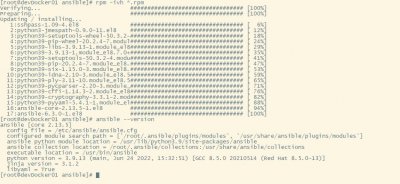
相关阅读
-

windows101809版本 windows1019587版本更新了什么
IT袋网小编为你介绍windows1019587版本更新了什么的介绍,关于windows101809版本 windows1019587版本更新了什么,继续往下看吧! 就在微软公司推出了win10系统之后,也是在不断的更新升级新的系统。那
-

win7低配精简版 低配电脑装win7比较好流畅的版本介绍
小编带来的是低配电脑装win7比较好流畅的版本介绍的方法内容,关于win7低配精简版 低配电脑装win7比较好流畅的版本介绍,接下来就是全面介绍。 如果我们目前使用的电脑配置情况比较低的话
-
win10兼容性视图设置教程 microsoft浏览器怎么设置兼容性视图
小编为大家讲一讲win10兼容性视图设置教程的内容,关于win10兼容性视图设置教程 microsoft浏览器怎么设置兼容性视图,接下来IT袋小编为大家介绍。 在win10系统中使用ie浏览器的用户都会需要使
-

windows10镜像文件在哪里下载 win10系统2004版本镜像在哪下载
如果想了解win10系统2004版本镜像在哪下载方面的内容,关于windows10镜像文件在哪里下载 win10系统2004版本镜像在哪下载,相关内容具体如下: 最近比较多的IT袋朋友们用上了win10 2004版本系统,剩