
Ansible安装配置和基本使用(5)
导读:Ansible安装配置和基本使用,使用逻辑与 在websrvs组并且在dbsrvs组中的主机。 [root@ansible-srv1 ansible-example]# ansible "websrvs:dbsrvs" -m ping10.10.108.30 | SUCCESS => { "ansible_facts": { "discovered_interpret
Ansible安装配置和基本使用
使用逻辑与
在websrvs组并且在dbsrvs组中的主机。
[root@ansible-srv1 ansible-example]# ansible "websrvs:&dbsrvs" -m ping
10.10.108.30 | SUCCESS => {
    "ansible_facts": {
        "discovered_interpreter_python": "/usr/bin/python"
    },
    "changed": false,
    "ping": "pong"
}
使用逻辑非
在websrvs组,但不在dbsrvs组中的主机.注意:此处只能是单引号。
[root@ansible-srv1 ansible-example]# ansible 'websrvs:!dbsrvs' -m ping
10.10.108.33 | SUCCESS => {
    "ansible_facts": {
        "discovered_interpreter_python": "/usr/bin/python"
    },
    "changed": false,
    "ping": "pong"
}
10.10.108.31 | SUCCESS => {
    "ansible_facts": {
        "discovered_interpreter_python": "/usr/bin/python"
    },
    "changed": false,
    "ping": "pong"
}
10.10.108.32 | SUCCESS => {
    "ansible_facts": {
        "discovered_interpreter_python": "/usr/bin/python"
    },
    "changed": false,
    "ping": "pong"
}
使用正则表达式
[root@ansible-srv1 ansible-example]# ansible "websrvs:&dbsrvs" -m ping
10.10.108.30 | SUCCESS => {
    "ansible_facts": {
        "discovered_interpreter_python": "/usr/bin/python"
    },
    "changed": false,
    "ping": "pong"
}
[root@ansible-srv1 ansible-example]# ansible "~(web|db)srvs" -m ping
10.10.108.30 | SUCCESS => {
    "ansible_facts": {
        "discovered_interpreter_python": "/usr/bin/python"
    },
    "changed": false,
    "ping": "pong"
}
10.10.108.33 | SUCCESS => {
    "ansible_facts": {
        "discovered_interpreter_python": "/usr/bin/python"
    },
    "changed": false,
    "ping": "pong"
}
10.10.108.31 | SUCCESS => {
    "ansible_facts": {
        "discovered_interpreter_python": "/usr/bin/python"
    },
    "changed": false,
    "ping": "pong"
}
10.10.108.32 | SUCCESS => {
    "ansible_facts": {
        "discovered_interpreter_python": "/usr/bin/python"
    },
    "changed": false,
    "ping": "pong"
}
3.2.2 ansible执行命令过程
- 加载自己的配置文件默认
/etc/ansible/ansible.cfg,如果指定了你自定义的清单文件,则从自己的清单文件中查找被管理主机 - 加载自己对应的模块文件,如:
command - 通过ansible将模块或命令生成对应的临时py文件,并将该文件传输至远程服务器的对应执行用户
$HOME/.ansible/tmp/ansible-tmp-数字/XXX.PY文件 - 给文件+x执行
- 执行并返回结果
- 删除临时py文件,退出
可以通过加参数-v或者-vvv列出详细的执行过程(可以多加几个v参数)。
[root@ansible-srv1 ansible-example]# ansible "~(web|db)servers" -vvv -m ping > ansible.log
[root@ansible-srv1 ansible-example]# grep "chmod" ansible.log
3.2.3 ansible执行后颜色描述
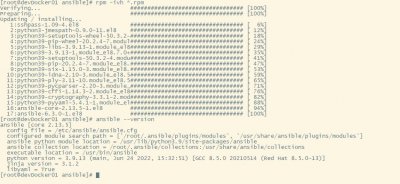
默认情况下是以下三种颜色:

相关阅读
-

windows101809版本 windows1019587版本更新了什么
IT袋网小编为你介绍windows1019587版本更新了什么的介绍,关于windows101809版本 windows1019587版本更新了什么,继续往下看吧! 就在微软公司推出了win10系统之后,也是在不断的更新升级新的系统。那
-

win7低配精简版 低配电脑装win7比较好流畅的版本介绍
小编带来的是低配电脑装win7比较好流畅的版本介绍的方法内容,关于win7低配精简版 低配电脑装win7比较好流畅的版本介绍,接下来就是全面介绍。 如果我们目前使用的电脑配置情况比较低的话
-
win10兼容性视图设置教程 microsoft浏览器怎么设置兼容性视图
小编为大家讲一讲win10兼容性视图设置教程的内容,关于win10兼容性视图设置教程 microsoft浏览器怎么设置兼容性视图,接下来IT袋小编为大家介绍。 在win10系统中使用ie浏览器的用户都会需要使
-

windows10镜像文件在哪里下载 win10系统2004版本镜像在哪下载
如果想了解win10系统2004版本镜像在哪下载方面的内容,关于windows10镜像文件在哪里下载 win10系统2004版本镜像在哪下载,相关内容具体如下: 最近比较多的IT袋朋友们用上了win10 2004版本系统,剩