
如何解决由触发器导致mysql内存溢出问题(3)
如何解决由触发器导致mysql内存溢出问题

Tried to tweak table_open_cache_instances to affect this?
查询此参数描述:
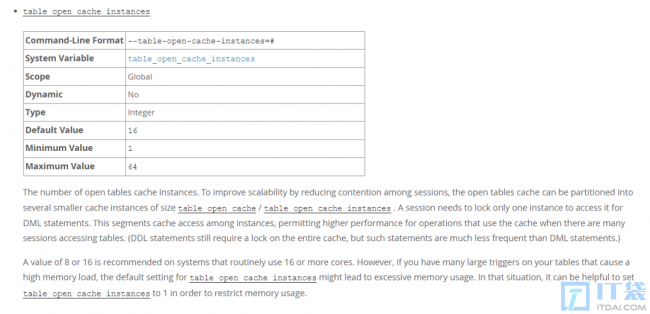
A value of 8 or 16 is recommended on systems that routinely use 16 or more cores. However, if you have many large triggers on your tables that cause a high memory load, the default setting for table_open_cache_instances might lead to excessive memory usage. In that situation, it can be helpful to set table_open_cache_instances to 1 in order to restrict memory usage.
根据官方的解释可以了解到,如果有许多大的触发器,参数table_open_cache_instances的默认值可能会造成内存使用过多。
比如table_open_cache_instances设置为 16,那么表缓存会划分为 16 个table instance。当并发访问大时,最多的情况下一个表的缓存信息会出现在每一个table instance里面。
再有每次将表信息放入表缓存时,所有关联的触发器都被放入memory/sql/sp_head::main_mem_root中,table_open_cache_instances设置的越大其所占内存也就越大,以及存储过程也会消耗更多的内存,所以导致内存一直上升最终导致 OOM。
下面简单验证一下触发器对内存的影响。
当table_open_cache_instances为 8 时:
#清空缓存
mysql> flush tables;
Query OK, 0 rows affected (0.00 sec)
[root@test ~]# cat test.sh
for i in `seq 1 1 8`
do
mysql -uroot -p test -e "select * from test;"
done
[root@test ~]# sh test.sh
mysql> show variables like '%table_open_cache_instances%';
+----------------------------+-------+
| Variable_name | Value |
+----------------------------+-------+
| table_open_cache_instances | 8 |
+----------------------------+-------+
1 row in set (0.00 sec)
mysql> SELECT current_alloc FROM sys.memory_global_by_current_bytes WHERE event_name='memory/sql/sp_head::main_mem_root';
+---------------+
| current_alloc |
+---------------+
| 119.61 KiB |
+---------------+
1 row in set (0.00 sec)
在该表上创建一个触发器。
mysql> \d|
mysql> CREATE TRIGGER trigger_test BEFORE INSERT ON test FOR EACH ROW BEGIN SIGNAL SQLSTATE '45000' SET message_text='Very long string. MySQL stores table descriptors in a special memory buffer, calle
'> at holds how many table descriptors MySQL should store in the cache and table_open_cache_instances t
'> hat stores the number of the table cache instances. So with default values of table_open_cache=4000
'> and table_open_cache_instances=16, you will have 16 independent memory buffers that will store 250 t
'> able descriptors each. These table cache instances could be accessed concurrently, allowing DML to u
'> se cached table descriptors without locking each other. If you use only tables, the table cache doe
'> s not require a lot of memory, because descriptors are lightweight, and even if you significantly increased the value of table_open_cache, it would not be so high. For example, 4000 tables will take u
'> p to 4000 x 4K = 16MB in the cache, 100.000 tables will take up to 390MB that is also not quite a hu
'> ge number for this number of open tables. However, if your tables have triggers, it changes the gam
'> e.'; END|
Query OK, 0 rows affected (0.00 sec)
#清空缓存
mysql> flush tables;
Query OK, 0 rows affected (0.00 sec)
然后访问表,查看缓存。
[root@test ~]# cat test.sh
for i in `seq 1 1 8`
do
mysql -uroot -p test -e "select * from test;"
done
[root@test ~]# sh test.sh
mysql> SELECT current_alloc FROM sys.memory_global_by_current_bytes WHERE event_name='memory/sql/sp_head::main_mem_root';
+---------------+
| current_alloc |
+---------------+
| 438.98 KiB |
+---------------+
1 row in set (0.00 sec)可以发现memory/sql/sp_head::main_mem_root明显增长较大。如果有很多大的触发器,那么所占内存就不可忽视(现场环境触发器里面很多是调用了存储过程)。
当table_open_cache_instances为 1 时:
mysql> flush tables;
Query OK, 0 rows affected (0.00 sec)
mysql> show variables like '%table_open_cache_instances%';
+----------------------------+-------+
| Variable_name | Value |
+----------------------------+-------+
| table_open_cache_instances | 1 |
+----------------------------+-------+
1 row in set (0.00 sec)
SELECT current_alloc FROM sys.memory_global_by_current_bytes WHERE event_name='memory/sql/sp_head::main_mem_root';
+---------------+
| current_alloc |
+---------------+
| 119.61 KiB |
+---------------+
1 row in set (0.00 sec)
mysql> #访问表
mysql> system sh test.sh
mysql> SELECT current_alloc FROM sys.memory_global_by_current_bytes WHERE event_name='memory/sql/sp_head::main_mem_root';
+---------------+
| current_alloc |
+---------------+
| 159.53 KiB |
+---------------+
1 row in set (0.00 sec)可以发现memory/sql/sp_head::main_mem_root所占内存增长较小。
由于大量触发器会导致表缓存和 memory/sql/sp_head::main_mem_root 占用更多的内存,根据实际环境,尝试把该从库的 table_open_cache_instances 修改为 1 后观察情况。
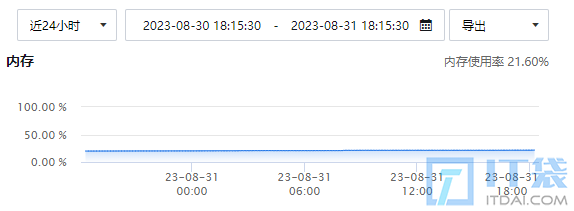
可以看到内存值趋于稳定,未再次出现内存使用率异常的问题。
3、总结
- MySQL 中不推荐使用大量的触发器以及复杂的存储过程。
table_open_cache_instances设置为 1 时,在高并发下会影响 SQL 的执行效率。本案例的从库并发量不高,其他场景请根据实际情况进行调整。- 触发器越多会导致memory/sql/sp_head::main_mem_root占用的内存越大,存储过程所使用的内存也会越大。
- 本文只是给出了解决内存溢出的一个方向,具体的底层原理请自行探索。
上面IT袋网为您介绍的如何解决由触发器导致mysql内存溢出问题的详细内容了,IT袋网网希望能给您带来帮助!


相关阅读
-

Linux Shell脚本实战: 自动更新系统时间并写入硬件时间
本文为您带来的是Linux及Shell脚本实战:方面的知识,下面为详细的介绍。 在Linux系统中,系统时间与硬件时间的准确性是非常重要的。 这对于日志记录,计划任务,甚至网络通信都至关重要。
-

电脑显示器黑屏怎么解决 电脑黑屏原因及解决办法
今日重点为您介绍电脑显示器黑屏怎么解决和电脑黑屏原因及解决办法的教程内容,很不错的方法小知识,建议收藏哦! 电脑原先一直可以正常使用,但这段时间突然时不时就黑屏了,这是怎
-

开机bios检测不到硬盘怎么办 关于bios找不到硬盘完美解决方法
本文为你介绍开机bios检测不到硬盘怎么办和关于bios找不到硬盘完美解决方法方面的介绍,下面IT袋为您详细介绍 电脑正常开机,却提示“找不到启动设备”,这时我们该怎么办呢?本文就为大
-

wifi路由器哪个品牌好 家用无线wifi用的牌子推荐
你是不是想知道wifi路由器哪个品牌好和家用无线wifi用的牌子推荐的IT知识,继续往下看吧! 随着网络通信技术的推广,路由器走进千家万户,成为家庭必备的设备之一。那么路由器哪个牌子好