
服务器如何查看网卡驱动和更换网卡驱动
导读:服务器如何查看网卡驱动和更换网卡驱动,小编为大家讲一讲服务器如何查看网卡驱动和更换网卡驱动方面的知识,下面小编为您详细解答 一.查看网卡驱动 要查看系统中网卡的驱动程序,您可以使用一些特定于您
服务器如何查看网卡驱动和更换网卡驱动
小编为大家讲一讲服务器如何查看网卡驱动和更换网卡驱动方面的知识,下面小编为您详细解答
一.查看网卡驱动
要查看系统中网卡的驱动程序,您可以使用一些特定于您的操作系统的命令。
以下是一些示例:
Linux:
使用 lspci 命令来列出 PCI 设备,然后查找网卡的相关信息:
lspci | grep Ethernetbin# lspci | grep Ethernet
0002:02:00.0 Ethernet controller: Cavium, Inc. Octeon Tx2 RVU Physical Function (rev 54)
0002:03:00.0 Ethernet controller: Cavium, Inc. Octeon Tx2 RVU Physical Function (rev 54)
0002:04:00.0 Ethernet controller: Cavium, Inc. Octeon Tx2 RVU Physical Function (rev 54)
0002:05:00.0 Ethernet controller: Cavium, Inc. Octeon Tx2 RVU Physical Function (rev 54)
0008:01:00.0 Ethernet controller: Marvell Technology Group Ltd. Device 2141然后,使用 lshw 或 ethtool 命令来获取更详细的信息:
sudo lshw -class networkbin# lshw -class network
*-network
description: Network controller
product: Octeon 10 RPM (MAC)
vendor: Cavium, Inc.
physical id: 10
bus info: pci@0000:01:10.0
version: 00
width: 32 bits
clock: 33MHz
capabilities: pciexpress msix bus_master cap_list
configuration: driver=Marvell-CGX!RPM latency=0
resources: irq:0 memory:87e0e0000000-87e0e07fffff memory:87e0e0800000-87e0e0ffffff或
sudo ethtool <interface_name>bin# ethtool eth1
Settings for eth1:
Supported ports: [ ]
Supported link modes: 10baseT/Half
10000baseSR/Full
Supported pause frame use: No
Supports auto-negotiation: No
Supported FEC modes: RS
Advertised link modes: Not reported
Advertised pause frame use: No
Advertised auto-negotiation: No
Advertised FEC modes: Not reported
Speed: 50000Mb/s
Duplex: Full
Auto-negotiation: off
Port: Twisted Pair
PHYAD: 0
Transceiver: internal
MDI-X: Unknown
Current message level: 0x00000000 (0)
Link detected: yesWindows:
在 PowerShell 中,可以使用Get-NetAdapter命令来获取网络适配器信息:
Get-NetAdapter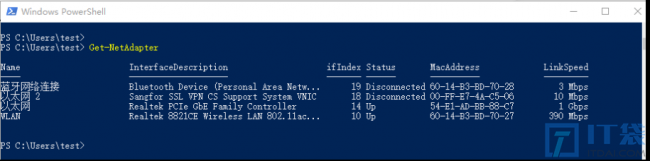
二.切换网卡驱动程序:
在一般情况下,更改网卡驱动程序可能不是一个简单的任务,因为它涉及到操作系统内核模块(Linux)或设备管理器(Windows)。
这通常需要一些谨慎的操作,并且可能需要重新启动系统。

相关阅读
-
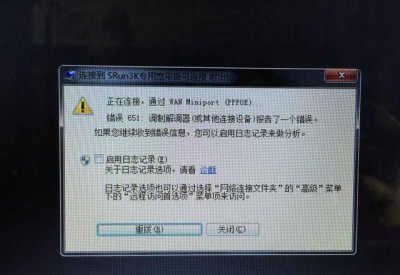
路由器651错误代码什么意思 宽带错误651最简单解决方法
小编为网友们解答路由器651错误代码什么意思和宽带错误651最简单解决方法的相关知识,接下来就是全面介绍。 用户在连接宽带的时候总是会有各种各样的问题,那么遇到宽带连接错误651是怎
-
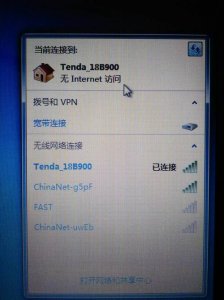
网线插着却显示无法识别网络WIFI可以用怎么回事
今天分享:网线插着却显示无法识别网络WIFI可以用怎么回事的相关经验,一起来看看吧! 在我们使用电脑连接网络时,经常会遇到网线插着却显示无法识别网络WIFI的情况,这种情况在很多人
-

电脑显示器红灯亮黑屏 显示器黑屏黄灯解决教程
今天带来的IT技巧小经验显示器黑屏黄灯解决教程的相关话题,关于电脑显示器红灯亮黑屏 显示器黑屏黄灯解决教程,具体介绍如下: 不少的IT袋网友在电脑使用的生涯中肯定都会大大小小的
-

电脑虚拟内存设置多少合适运行 台式电脑cpu性能排行榜
今日IT小知识分享:电脑虚拟内存设置多少合适运行和台式电脑cpu性能排行榜的话题,具体内容如下: 电脑上面的内存包括物理内存和虚拟内存,电脑主机上面的内存条就是物理内存;虚拟内